

 Dedicated IP
Your own IP.
Your own sender reputation.
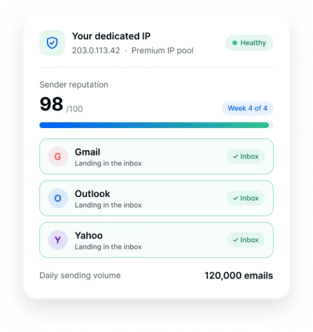
Send your emails from an IP address reserved only for your account, so no other sender can affect your deliverability.
 Add it from Billing & Usage › Add-ons · Payments secured by Stripe


What is a dedicated IP?
Every email you send travels through an IP address. A dedicated IP is an IP address assigned only to your account, so your sending reputation on it is built entirely by your own sending practices.

Shared IP
- Who uses it
- Multiple senders
- Who manages the reputation
- The Mailercloud team
- Available on
- Standard Mailercloud plans

Dedicated IP
- Who uses it
- Only your account
- Who manages the reputation
- Your own sending behavior
- Available on
- Add-on, $50/month per IP

Why send from a dedicated IP

Full reputation control
Your deliverability depends only on your own sending behavior.

A consistent sender identity
Gmail, Outlook and Yahoo see a stable, predictable sending source.

Built for high-volume sending
Regular sending builds a strong reputation that grows with your business.

Isolation from other senders
Other users’ actions never affect your reputation.
Is a dedicated IP right for you?
 Dedicated IP
A dedicated IP fits if you
 Send consistently at high volume, typically 100,000+ emails a month
- Want complete control over your sender reputation
- Keep stable, predictable sending patterns
 Shared IP
A shared IP may be better if you
- Send low volumes
- Send irregularly

Not sure which fits?
A dedicated IP needs consistent traffic to keep a healthy reputation. Our team will review your sending volume and recommend the right setup.
Warm up your IP the right way
A new IP has no sending history, so mailbox providers treat it cautiously until it earns a reputation. You can send normally during warm-up. These steps get the best results:
- Start with your most engaged contacts
- Increase volume gradually over 2–4 weeks
- Don’t send your full volume on day one
- Keep a consistent sending schedule
 Regular sending builds trust faster than sporadic bursts.


IP warm-up schedule
203.0.113.42Increase volume gradually over 2–4 weeks
| Week | Audience | Daily volume | Ramp |
|---|---|---|---|
| Week 1 | Most engaged | 2,000 | |
| Week 2 | Engaged | 15,000 | |
| Week 3 | Active | 40,000 | |
| Week 4 | Full list | Full volume |
Dedicated IP pricing
One simple per-IP price. Add as many IPs as you need.
Billed monthly. Switch to yearly for $480/year per IP and save 20%.
Get a dedicated IP Secure payments through Stripe. Mailercloud never stores your card details.
How billing works
- Multiple IPsBuy several at once or add more later, each at the same per-IP rate
- One billing cycleThe cycle you pick applies to all IPs in your subscription
- Switch anytimeMove between monthly and yearly; your IPs and their statuses stay the same
- Cancel anytimeA cancelled IP keeps working until the end of the period you’ve paid for



Dedicated IP
 Add IPs
 Switch billing
 Cancel one IP
 Invoices
Your IPs, billing and invoices in one place
Manage everything in one place
Billing & Usage › Add-ons › Dedicated IP- Add IPs anytimeMid-cycle additions are charged pro rata.
- Switch billingMonthly or yearly, with no change to your IPs.
- Cancel one IPIt keeps working until your billing period ends. Reactivate before then to keep the same IP and its reputation.
- Invoices in one placeUpdate payment details and download invoices.
Dedicated IP: FAQs
Everything you need to know about dedicated IPs. Still unsure? .
Take full control of your sender reputation
Get a dedicated IP from Billing & Usage › Add-ons. We’ll set it up and route your campaigns through it automatically.
- Cancel anytime
- Nothing to configure
- Secure payments via Stripe