Last updated: September 2026 | 16 min read
A SaaS company’s revenue doesn’t arrive at the signup. It arrives when a trial user reaches the moment the product becomes useful, converts, expands, and doesn’t churn. Email is the channel that moves users through every one of those moments, because it’s the only one that reaches them when they’re not in the app. SaaS email marketing is therefore less a newsletter programme than a lifecycle system: onboarding, activation nudges, trial conversion, product education, upgrade prompts, renewal and churn prevention, and win-back, most of it triggered by what the user did or didn’t do.
This guide covers how SaaS teams of any size build that system in 2026: the lifecycle stages and what to send at each, the difference between marketing, product, and transactional email and why the split matters for deliverability, segmentation by plan and behaviour, the platforms that fit, and the metrics that tie email to revenue. It’s vendor-neutral, with one tools section near the end.
Quick Answer: SaaS email marketing is a lifecycle system rather than a newsletter: onboarding built around your activation event, trial-ending reminders with usage data, feature-adoption and upgrade prompts, renewal reminders, a dunning sequence for failed payments, and a win-back series — triggered by what users do or don’t do in the product. Keep transactional email (verifications, receipts, resets) on a separate authenticated subdomain from marketing, sync product events to your email platform, and measure activation, conversion, expansion, and recovery rather than opens.
Table of Contents
What SaaS Email Marketing Is
SaaS email marketing is the use of email across the customer lifecycle of a subscription software product: acquiring leads, converting trials or free users to paid, driving activation and adoption, expanding accounts, retaining subscribers at renewal, and winning back churned customers. It spans three kinds of email that are often conflated:
Marketing email goes to leads and customers who’ve opted in: newsletters, product announcements, webinars, case studies, upgrade campaigns.
Product (lifecycle) email is triggered by user behaviour or its absence: onboarding sequences, “you haven’t set up X” nudges, usage milestones, trial-ending reminders, feature adoption prompts.
Transactional email is triggered by the system: signup verification, password resets, receipts, invoices, security alerts, usage-limit notices.
The lines matter operationally. Transactional mail must reach every user regardless of marketing consent, product email lives in the space between, and marketing email needs opt-in and an unsubscribe. Sending all three from one stream, or one domain, is the most common SaaS deliverability mistake.
Why Email Is the SaaS Growth Channel
Every SaaS metric that matters (activation rate, trial conversion, net revenue retention, churn) is a behaviour change, and email is the cheapest way to prompt one. A user who signs up and never returns costs the same to acquire as one who converts; an onboarding email that brings 5% more of them back to the product compounds through every downstream metric.
Litmus’s State of Email research puts email’s return at around $36 per $1 spent across industries, and SaaS tends to sit above the average because the audience is known (you have their usage data), the offers are specific (a feature they haven’t tried, a plan that fits their usage), and the actions are measurable inside the product. Industry benchmark reports from Mailchimp and Campaign Monitor typically show software and technology among the higher-engagement sectors for lifecycle email.
The strategic case is retention. Acquiring a new customer costs several times more than keeping one, and email is the primary retention channel most SaaS companies actually control: not the app (users have to open it), not ads (the user is already a customer), but the inbox.
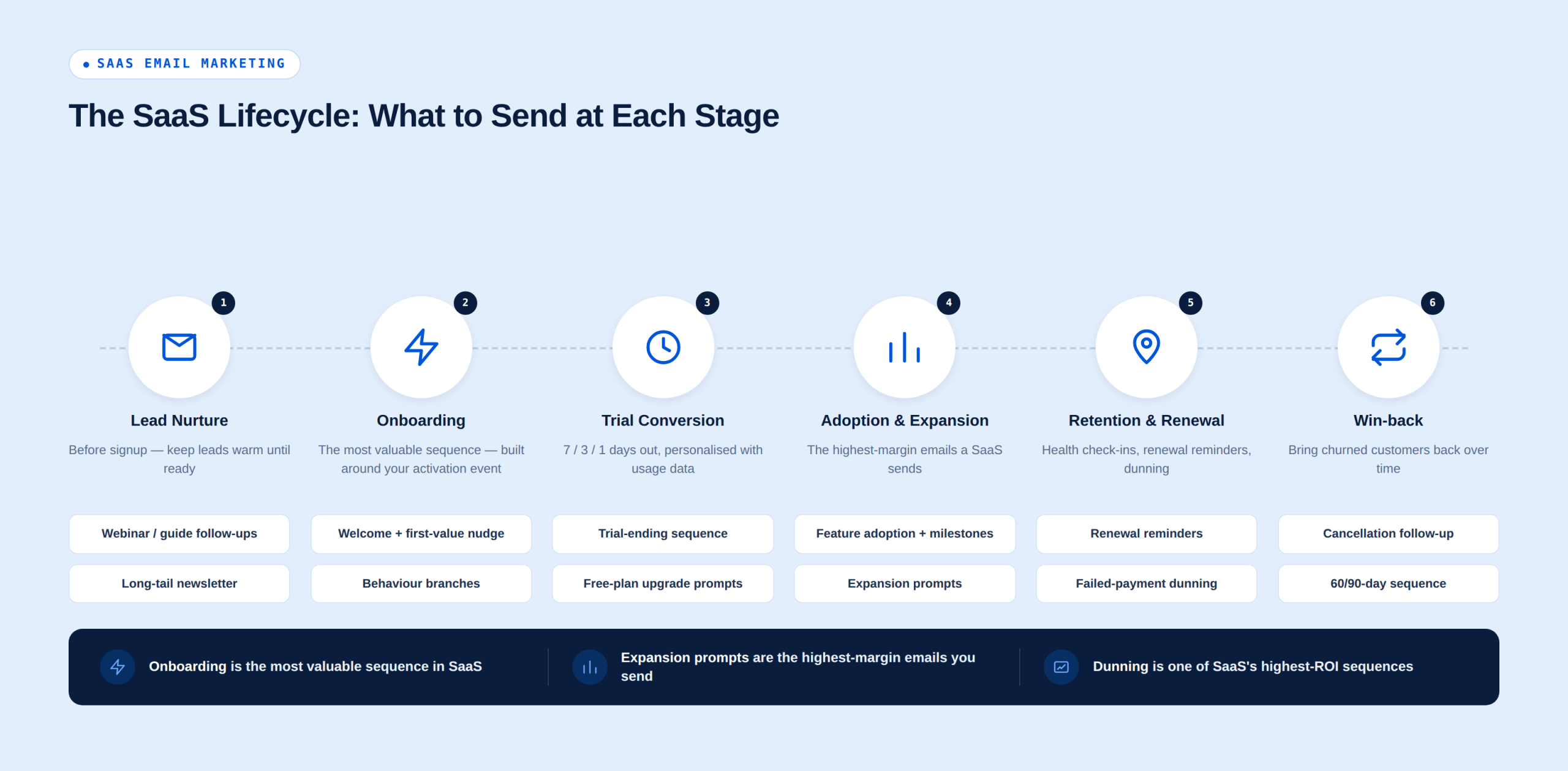
The SaaS Lifecycle: What to Send at Each Stage
Lead nurture (before signup)
Content and webinar follow-ups. A lead who downloads a guide or attends a webinar enters a short sequence: the resource, a related use case, a customer story, an invitation to try the product. Three to five emails over two weeks.
Newsletter. Monthly or fortnightly: product updates, one useful piece of content, one customer example. This is the long-tail nurture for leads who aren’t ready.
Onboarding (signup to activation)
The most valuable sequence in SaaS. Define your activation event (the action after which users are far more likely to convert and retain: a first project created, an integration connected, a first report run) and build the sequence to get users there.
Welcome (immediately). One thing to do first, a link straight into it, and who to contact. Day 1–3: the first-value nudge. If the activation event hasn’t happened, a short email with the single step that gets them there, ideally with a screenshot or 30-second video. Day 3–7: use-case education. How customers like them use the product; one feature per email. Behaviour branches. Users who activate skip the nudges and get “next step” emails; users who don’t get a different, more direct path, and eventually a human touch (a reply from a real person, an offer of a call).
Trial conversion
Trial-ending sequence. Seven days, three days, one day before the trial ends, and the day after: what they’ve done, what they’ll lose, how to upgrade. Personalised with usage data (“you’ve created 14 projects”). A time-limited incentive on the final email is common but not necessary if activation is strong.
Free-plan upgrade prompts. For freemium: triggered by hitting a limit, using a paid-plan feature, or reaching a usage threshold that correlates with conversion.
Adoption and expansion
Feature adoption. Triggered when a user hasn’t used a feature that correlates with retention. One feature, one email, one link into it. Usage milestones. “You’ve sent 10,000 emails”, “Your team has grown to 5 seats”. Recognition plus a relevant next step. Expansion prompts. Seat limits approaching, usage nearing plan caps, features on a higher plan the account keeps bumping into. These are the highest-margin emails a SaaS sends. Product updates and release notes. Monthly or per release, segmented by plan and by whether the feature applies to the user.
Retention and renewal
Health-based check-ins. Triggered by declining usage: a “here’s what you might be missing” email, then a human reach-out if usage keeps falling. Renewal reminders. For annual plans: 60, 30, and 7 days out, with a summary of value delivered (usage stats, outcomes). Failed payment (dunning). Transactional, and one of the highest-ROI sequences in SaaS: a payment failed notice, two reminders, and a final notice, with a one-click update link. Involuntary churn from failed cards is often a large share of total churn, and dunning email recovers much of it.
Win-back
Cancellation follow-up. A short survey on exit, a save offer where appropriate, and a “we’ll keep your data for X days” notice. Churned-customer sequence. Sixty and ninety days after cancellation, and again when a feature they asked for ships: what’s new, what’s changed, an easy way back.
Segmentation for SaaS
- Lifecycle stage: lead, trial, free, paid, at-risk, churned.
- Plan and billing: free, starter, pro, enterprise; monthly versus annual; seat count.
- Activation and usage: activated or not; feature usage flags; usage relative to plan limits; last-login recency.
- Role and persona: admin versus end user; the buyer and the daily user are often different people and need different emails.
- Company attributes: size, industry, and use case from signup or enrichment.
- Engagement with email: clickers get more; non-openers get less and a re-permission email.
The data lives in your product database and billing system. The integration that pushes user events and attributes to the email platform (directly via API, through a customer data platform, or via Zapier/webhooks) is the foundation of every lifecycle email above. Without it, you’re sending newsletters.
Deliverability and Compliance for SaaS
Separate streams. Transactional email (verifications, receipts, resets, alerts) should send from its own subdomain (for example, mail.yourapp.com) on a transactional service or an API, isolated from marketing. A marketing complaint spike must never delay a password reset. Product lifecycle email can sit with either, but most teams keep behaviour-triggered emails on the marketing side with their own subdomain.
Authentication. SPF, DKIM, and DMARC on every sending domain and subdomain. The 2024 Gmail and Yahoo bulk-sender requirements (authentication, one-click unsubscribe, complaint rate under 0.3%) apply to any sender over 5,000 messages a day. Our SPF, DKIM and DMARC guide covers the setup; the Gmail and Yahoo sender requirements post covers the thresholds.
Consent. Signup implies consent to transactional and reasonable product email; marketing newsletters need a clear opt-in (a checkbox at signup, unchecked by default for EU/UK users under GDPR and PECR). Keep the two consents separate in your data.
Unsubscribe. One-click for marketing and lifecycle email. Transactional email doesn’t need one, but a preference centre that lets users tune product notifications reduces complaints.
List hygiene. Trial signups include a high share of throwaway addresses. Verify at signup or before the first marketing send, suppress hard bounces immediately, and sunset free users who haven’t logged in or opened in six months.
SaaS Email Best Practices
- Define the activation event and build onboarding around it. Everything else is secondary.
- Trigger on behaviour, not time, wherever you can. “You haven’t connected an integration” beats “It’s day 3”.
- One action per email. A single link into the product, deep-linked to the feature.
- Personalise with usage data. Numbers from the user’s own account are the most persuasive content you have.
- Send lifecycle email from a person. A founder or a product lead, with a monitored reply-to. Replies are product feedback and support tickets you’d otherwise miss.
- Plain templates for lifecycle, designed templates for marketing. Product emails should look like the app; newsletters can look like marketing.
- Keep transactional email fast and separate. Measure time-to-inbox on verifications and resets.
- Build dunning before you build anything else in retention. It’s the most predictable revenue recovery in SaaS.
- Test one variable per send. Subject lines on lifecycle emails run for months; small wins compound.
- Match frequency to stage. Trials get more email; long-term paid users get less; at-risk users get a human.
Common SaaS Email Mistakes
- Time-based onboarding with no behaviour branches. Users who activated on day one get told how to activate on day three.
- Sending marketing and transactional from the same stream and domain. One bad campaign delays every password reset.
- No dunning sequence. Involuntary churn quietly eating revenue.
- Product updates to everyone. A feature on the enterprise plan announced to free users breeds resentment and unsubscribes.
- Ignoring the buyer/user split. Renewal emails to a daily user who doesn’t hold the budget.
- Measuring opens. Unreliable since Apple Mail Privacy Protection; measure clicks, in-product actions, and conversions.
- Never sunsetting free users. Years of inactive free accounts drag down deliverability for the paying customers you’re trying to retain.
Tools and Platforms for SaaS Email Marketing
SaaS teams typically need two capabilities: a marketing and lifecycle platform with an API or event integration that can trigger on user behaviour, and a transactional service (or the same platform’s API) for system email. Dedicated product-messaging tools (Customer.io, Intercom, Braze) are built for event-driven lifecycle email at scale and priced accordingly; general email platforms with automation and an API cover most early-stage and mid-sized SaaS at a fraction of the cost.
| Platform | Best For | Free Plan | Starting Price | Why for SaaS |
|---|---|---|---|---|
| Mailercloud#1 Pick | Early-stage & mid-sized SaaS | ✓ Yes 1,000 contacts | $10/mo | Lifecycle automation + Email API + Inbox Tracker from one vendor |
| Customer.io | Product-led, event-driven at scale | ✗ Trial 14 days | ~$100/mo | Native event ingestion, multi-channel workflows |
| HubSpot | Sales-led SaaS with CRM | ✓ Yes 2,000 emails/mo | $20/mo/seat | CRM + marketing; lifecycle workflows on Professional ($800/mo) |
| ActiveCampaign | Deep automation + CRM | ✗ Trial 14 days | $19/mo | Event triggers, site tracking, branching |
| Brevo | Large free tiers, volume pricing | ✓ Yes 300/day | ~$9/mo | Marketing + transactional + SMS; unlimited contacts |
Pricing verified September 13–14, 2026 on each platform’s official pricing page, monthly billing unless noted.
Mailercloud
Mailercloud fits early-stage and mid-sized SaaS teams that want lifecycle email and transactional email from one vendor without product-messaging-tool pricing. The marketing side is free for 1,000 contacts and 12,000 emails a month, then $10/month for 5,000 contacts with unlimited sends, with a visual automation builder for onboarding, trial-ending, and win-back sequences, segmentation by plan and behaviour once user attributes are synced, A/B testing, and AMP for Email for in-email surveys and NPS. The separate Email API handles verifications, receipts, and alerts from $10/month for 50,000 emails with SMTP, webhooks, and around one-second delivery, and Inbox Tracker shows whether lifecycle and transactional mail reach the inbox across Gmail, Outlook, and Yahoo, a visibility most product-messaging tools don’t offer. Limitations: behaviour triggers depend on pushing user events in via the API, webhooks, or Zapier rather than a native product SDK; the integration library is smaller than HubSpot’s; and native SMS is still in development.
✅Mailercloud Pros:
- Marketing side free for 1,000 contacts; $10/month for 5,000 contacts with unlimited sends
- Visual automation builder for onboarding, trial-ending, adoption, and win-back sequences
- Segmentation by plan, usage flags, and lifecycle stage once attributes are synced
- AMP for Email for in-email NPS and surveys
- Separate Email API for transactional mail from $10/month for 50,000 emails, with SMTP and webhooks
- Inbox Tracker shows whether onboarding and transactional mail reach the inbox
- A/B testing; custom sending domains with guided authentication
- 24/7 live chat support
❌Mailercloud Cons:
- Behaviour triggers rely on pushing events via API, webhooks, or Zapier — no native product SDK
- Smaller integration library than HubSpot
- Native SMS still in development
💰Pricing: Marketing: free for up to 1,000 contacts, Premium from $10/month. Email API from $10/month for 50,000 emails.
Customer.io
Customer.io is built for event-driven lifecycle messaging: it ingests product events directly, branches on them, and sends email, push, SMS, and in-app from one workflow. It’s the tool product-led SaaS teams grow into; pricing starts around $100/month and scales with profiles.
HubSpot
HubSpot combines marketing email with a CRM, which suits sales-led SaaS where marketing and sales share the pipeline. Marketing Hub Starter is from $20/month per seat; Professional, where the lifecycle workflows live, is $800/month plus onboarding. See our HubSpot alternatives post for the cheaper routes.
ActiveCampaign
ActiveCampaign’s automation builder is among the deepest available, with site tracking and event-based triggers, plus a sales CRM. No free plan; Starter from $19/month, with the automation depth on Plus and Pro.
Brevo
Brevo bundles marketing, transactional (API and SMTP), SMS, and a CRM, with unlimited contacts and volume-based pricing that suits SaaS with large free tiers. Automation and A/B testing arrive on Standard.
Transactional specialists (Postmark, Amazon SES, Resend)
For teams that keep transactional email entirely separate: Postmark for time-to-inbox, Amazon SES for cost at scale, Resend for a modern developer API. Our SendGrid alternatives roundup compares the transactional specialists in detail.
SaaS Email Metrics and KPIs
Track by lifecycle stage and tie each to a product or revenue outcome:
- Activation rate from onboarding: users reaching the activation event ÷ signups, split by onboarding email engagement.
- Trial-to-paid conversion: conversions ÷ trials, with the trial-ending sequence’s contribution.
- Feature adoption lift: usage of a feature after an adoption email versus a holdout.
- Expansion revenue from email: upgrades and seat adds attributed to upgrade prompts.
- Dunning recovery rate: failed payments recovered ÷ failed payments.
- Churn and win-back rate: churned accounts reactivated ÷ win-back emails sent.
- Click-through rate and click-to-action rate: the engagement signals; opens are unreliable.
- Transactional time-to-inbox and delivery rate: verifications and resets measured separately.
- Unsubscribe and complaint rates: under 0.5% and 0.1%; complaints above 0.3% trigger Gmail throttling.
- Inbox placement: especially for onboarding, where a spam-foldered welcome email is a lost activation.
How to Get Started: A 7-Step Plan
- Define your activation event from product data.
- Separate transactional from marketing: different subdomains, authenticated, ideally different services or streams.
- Sync user attributes and events to the email platform (API, webhooks, CDP, or Zapier).
- Build the onboarding sequence with a behaviour branch at the activation event.
- Build the trial-ending (or upgrade) sequence and the dunning sequence.
- Add adoption, renewal, and win-back one at a time, measured against holdouts.
- Report activation, conversion, expansion, and recovery from email monthly.
Frequently Asked Questions
What is SaaS email marketing?
SaaS email marketing is the use of email across a subscription software product’s customer lifecycle, from lead nurture and onboarding through trial conversion, feature adoption, expansion, renewal, dunning, and win-back, using behaviour-triggered lifecycle emails alongside marketing newsletters and system-triggered transactional email.
What emails should a SaaS company send?
A SaaS company should send a welcome and onboarding sequence built around its activation event, trial-ending reminders with usage data, feature-adoption and usage-milestone emails, upgrade prompts triggered by plan limits, renewal reminders for annual plans, a dunning sequence for failed payments, product updates segmented by plan, a cancellation follow-up and win-back series, and a periodic newsletter for leads.
What is the difference between transactional and marketing email in SaaS?
Transactional email is triggered by the system for an individual user (verification, password reset, receipt, alert) and must reach everyone regardless of marketing consent, while marketing email is promotional content sent to opted-in contacts with an unsubscribe; SaaS teams should send them from separate subdomains or streams so a marketing complaint spike never delays a password reset.
How do SaaS companies reduce churn with email?
SaaS companies reduce churn with email through a dunning sequence that recovers failed payments, usage-based check-ins triggered by declining activity, renewal reminders that summarise value delivered, feature-adoption emails for features that correlate with retention, and a win-back series sent 60 and 90 days after cancellation and when requested features ship.
What is a good open rate for SaaS emails?
Open rates for SaaS emails are unreliable since Apple Mail Privacy Protection began pre-loading images in 2021, so teams should benchmark click-through rate, click-to-action rate, and in-product outcomes instead; industry benchmark reports from Mailchimp and Campaign Monitor place software and technology among the higher-engagement sectors, and lifecycle emails typically outperform newsletters several times over.
What is the best email marketing platform for SaaS?
The best email platform for SaaS is one that can trigger on product events and handle transactional email separately; Customer.io is the dedicated lifecycle tool for product-led teams at scale, HubSpot suits sales-led SaaS with a CRM, and Mailercloud fits early-stage and mid-sized teams that want automation, segmentation, AMP surveys, an Email API for transactional mail, and Inbox Tracker from one vendor at $10/month.
How often should SaaS companies email customers?
SaaS companies should match frequency to lifecycle stage: several emails in the first week of a trial, triggered rather than scheduled; one or two product emails a month for established paid users; a monthly newsletter for leads; and more frequent, human-written outreach only for at-risk accounts.
Summary
SaaS email marketing is a lifecycle system, not a newsletter. Define the activation event, separate transactional from marketing email, sync product data to the email platform, and build the sequences in order of revenue impact: onboarding, trial conversion, dunning, adoption, renewal, win-back. Trigger on behaviour, personalise with usage data, send from a person, and measure activation, conversion, expansion, and recovery rather than opens.
Onboard, convert & retain users with email that reaches the inbox
Get started →Free for 1,000 contacts · Email API from $10/month · No credit card

As a Marketing Director, I develop and implement marketing strategies, conduct market research, and manage a team of marketing professionals. With a successful track record of launching campaigns that drive revenue growth, I bring my marketing expertise to blog writing, creating engaging content that promotes the brand and its products/services.