Whether you’re a freelancer sending proposals or a sales rep following up with prospects, your email signature is the last thing people see before they decide whether to respond. A sloppy signature — or worse, no signature at all — can quietly undermine an otherwise strong email.
Signature Hound is one of the most searched free tools for this job. This review breaks down exactly what it does, how to set it up, and whether it’s the right choice for your situation in 2026.
For a deeper dive, see Convertkit alternatives.
Table of Contents
What is Signature Hound?
Signature Hound is a free online email signature generator that lets you build professional, branded email signatures without writing any HTML code. You fill in your details, choose a layout, add your logo and social icons, and copy the finished signature directly into your email client.
Related reading: Activecampaign alternatives.
It works with every major email platform — Gmail, Outlook, Apple Mail, Yahoo Mail — and requires no account creation or subscription to use.
The tool is built and maintained by a small independent team and has been available since 2015. Its main appeal is that it does one thing well — generates clean, compatible email signatures — without paywalls, forced branding, or unnecessary complexity.
Related guide: Best Brevo Alternatives.
Key features of Signature Hound
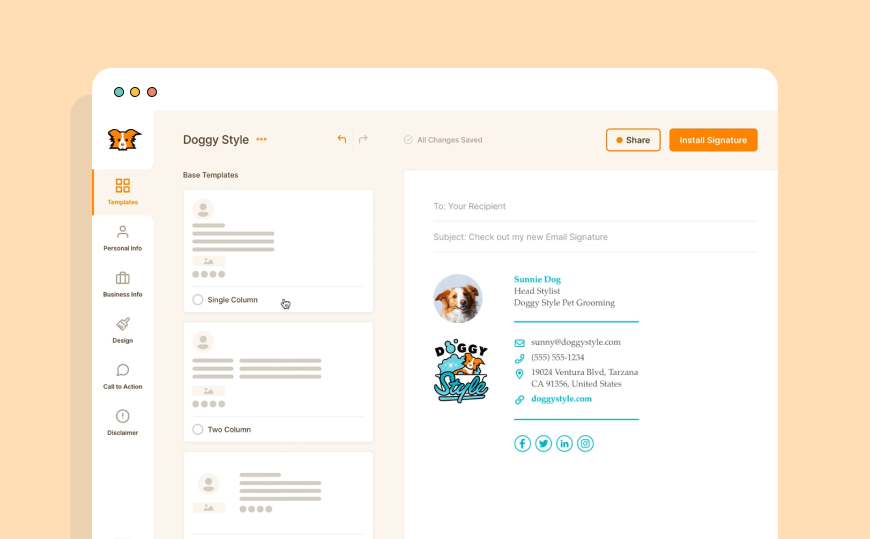
Drag-and-drop editor — build and rearrange your signature visually with no coding required.
Full email client compatibility — signatures render correctly in Gmail, Outlook, Apple Mail, Yahoo, and other major clients on both desktop and mobile.
Social media icons — add clickable icons for LinkedIn, Twitter/X, Instagram, Facebook, and other platforms.
Logo and image support — upload your company logo or profile photo directly into the signature.
Brand colour and font control — match your signature to your brand identity with custom colour and typography options, and use a LinkedIn banner maker to keep the same visual identity consistent on your LinkedIn profile.
Team management — businesses can manage multiple signatures across team members from one account.
Mobile-responsive output — signatures automatically adapt for mobile screens so they look clean regardless of device.
Privacy-first — Signature Hound does not store your personal data, insert tracking pixels, or add its own branding to your signature.
Free for individuals — the core tool is completely free with no hidden costs or forced upgrades for individual use.
How to create an email signature with Signature Hound
Setup takes under five minutes. Here’s the exact process:
Step 1 — Go to signaturehound.com No account creation needed. The editor loads immediately.
Step 2 — Choose a template Select from the available pre-built layouts. Pick one that matches your profession — minimal for freelancers, more structured for corporate or sales roles.
Step 3 — Fill in your details Enter your name, job title, company name, phone number, website URL, and any other fields you want to include.
Step 4 — Upload your logo or photo Add a profile image or company logo. Keep images under 100KB for best compatibility across email clients.
Step 5 — Add social media icons Select which platforms to include and paste in your profile URLs. Icons are automatically sized and linked.
Step 6 — Customise colours and fonts Adjust the colour scheme to match your brand. Stick to web-safe fonts for maximum compatibility across email clients.
Step 7 — Preview and copy Preview how your signature looks on desktop and mobile, then copy the HTML code or use the direct install option for Gmail or Outlook.
How to install in Gmail: Go to Gmail Settings → See all settings → General → Signature → Create new → paste your Signature Hound output → Save changes.
How to install in Outlook: Go to File → Options → Mail → Signatures → New → paste your Signature Hound output → assign to new/reply emails → OK.
Is Signature Hound really free?
Yes — Signature Hound is free for individual use with no subscription required. You get access to the full editor, all templates, and HTML export without paying anything.
For teams and businesses, there are paid options that add centralised management, brand controls across multiple users, and admin oversight. But for a freelancer or small team, the free plan covers everything you need.
There are no ads inserted into your signature, no forced “Made with Signature Hound” branding, and no trial period that expires.
Signature Hound vs alternatives: honest comparison
| Feature | Signature Hound | WiseStamp | MySignature | HubSpot |
|---|---|---|---|---|
| Free plan | Yes — fully free | Limited free tier | Limited free tier | Yes — free tool |
| HTML export | Yes | Yes | Yes | Yes |
| No forced branding | Yes | No — on free plan | No — on free plan | Yes |
| No login required | Yes | No | No | No |
| Team management | Paid plan | Paid plan | Paid plan | Paid plan |
| Mobile responsive | Yes | Yes | Yes | Yes |
| Privacy — no tracking | Yes | No | No | No |
Who should use Signature Hound?
Signature Hound is the right choice if you want a completely free, no-login email signature with no branding attached. It suits:
- Freelancers and independent consultants who send regular client emails
- Small business owners who need a clean signature without paying a monthly fee
- Remote workers who want consistent signatures across multiple email clients
- Nonprofits and educators with limited budgets
- Anyone who wants to set up a signature quickly without creating another account
It may not be the right fit if you need centralised signature management across a large team, email tracking and analytics, or deep CRM integrations — for those needs a paid platform like WiseStamp Business or Exclaimer may be more appropriate.
From email signature to email campaigns
A professional email signature handles one-to-one communication. But when you need to reach hundreds or thousands of contacts at once — newsletters, product updates, onboarding sequences — you need a dedicated email marketing platform.
Mailercloud lets you build and send professional email campaigns to your entire contact list, with personalisation, automation, and deliverability built in. If you’ve already got your signature sorted with Signature Hound, the next step is making sure your bulk emails look just as professional. [Start free with Mailercloud →]
Frequently asked questions
What is Signature Hound?
Signature Hound is a free online tool that lets you create professional HTML email signatures without coding. It works with Gmail, Outlook, Apple Mail, and other major email clients.
Is Signature Hound free?
Yes. Signature Hound is completely free for individual use. There are no ads, no forced branding on your signature, and no trial period. Paid plans exist for team management features.
Does Signature Hound work with Gmail?
Yes. After creating your signature, you can copy the HTML output and paste it directly into Gmail’s signature settings under Settings → General → Signature.
Why is Signature Hound not working?
Common issues include: copying the signature in a plain text field instead of rich text/HTML, image hosting problems if you uploaded a logo that is no longer accessible, or compatibility issues with older versions of Outlook. Try re-generating the signature and using the direct install option instead of copying manually.
Does Signature Hound store my data?
No. Signature Hound does not store your personal information, track your emails, or insert hidden pixels into your signature.
Can I use Signature Hound for my whole team?
The free plan is designed for individual use. Team management — where you can control and push signatures across multiple users — is available on paid plans.
What are the best Signature Hound alternatives?
WiseStamp, MySignature, and HubSpot’s free signature generator are the most commonly used alternatives. WiseStamp has more templates but adds branding on the free plan. HubSpot’s tool is free but requires a HubSpot account. Signature Hound remains the best option if you want completely free, no-login, no-branding.
Can I add a banner or promotional image to my Signature Hound signature?
Yes. You can upload a banner image to include in your signature footer — useful for promoting a product launch, event, or offer.
Is Signature Hound mobile friendly?
Yes. All signatures generated are responsive and display cleanly on mobile devices as well as desktop.

As a Marketing Director, I develop and implement marketing strategies, conduct market research, and manage a team of marketing professionals. With a successful track record of launching campaigns that drive revenue growth, I bring my marketing expertise to blog writing, creating engaging content that promotes the brand and its products/services.