Last updated: September 2026 | 14 min read
Third-party delivery apps take 15–30% of every order and keep the customer’s details. Social media reaches a fraction of your followers unless you pay. Email is the one channel a restaurant owns outright: it reaches every guest who’s given you their address, it costs the same whether you send to 500 or 5,000, and it brings people back on the nights you choose. Restaurant email marketing in 2026 is about building that list from every table, reservation, and order, and running a handful of automations that fill quiet nights and turn first-time diners into regulars.
This guide covers how independent restaurants, small groups, cafés, bars, and quick-service operators build an email programme that increases visits and direct orders: what to send and when, how to grow the list, segmentation by visit behaviour, compliance, the platforms that fit hospitality budgets, and the metrics that matter. It’s vendor-neutral, with one tools section near the end.
Quick Answer: Restaurant email marketing is permission-based email to guests that drives reservations, direct orders, and repeat visits — the one channel a restaurant owns, unlike delivery apps that take 15–30% commission. Build the list at reservations, online ordering, Wi-Fi, and table QR codes with a stated welcome offer; automate welcome, birthday, post-visit review, and 90-day win-back emails; send a short, visual update weekly or fortnightly with one reason to visit; segment quiet-night offers to weekend guests; and measure redemptions, reservations, and direct orders rather than opens.
Table of Contents
What Restaurant Email Marketing Is
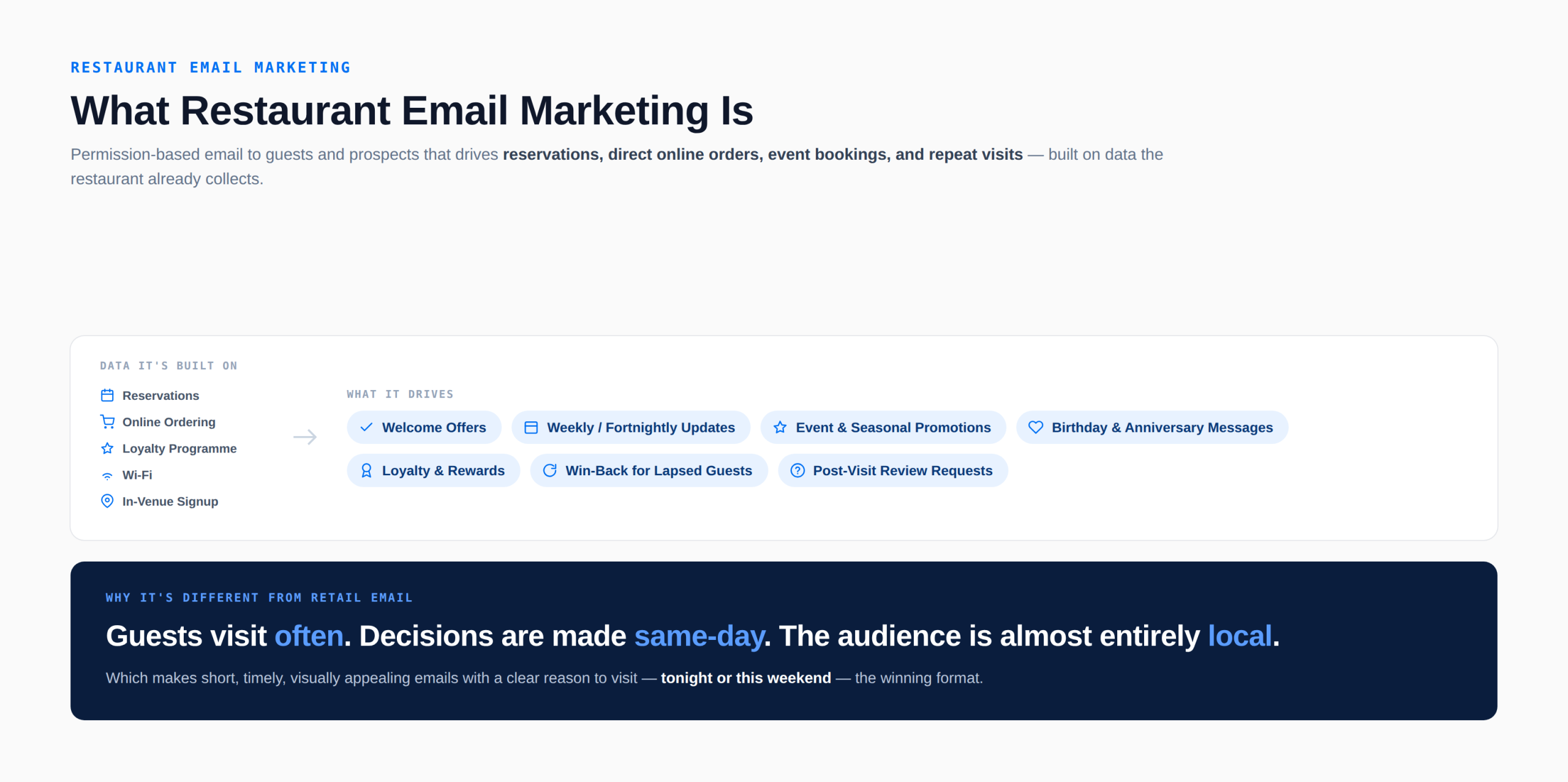
Restaurant email marketing is permission-based email to guests and prospects that drives reservations, direct online orders, event bookings, and repeat visits, using the data a restaurant already collects through reservations, online ordering, loyalty programmes, Wi-Fi, and in-venue signups. It covers welcome offers, weekly or fortnightly updates, event and seasonal promotions, birthday and anniversary messages, loyalty and rewards communication, win-back offers for lapsed guests, and post-visit review requests.
It differs from retail email in cadence and locality. Guests visit often, decisions are made the same day, and the audience is almost entirely local, which makes short, timely, visually appealing emails with a clear reason to visit tonight or this weekend the winning format.
Why Email Works for Restaurants
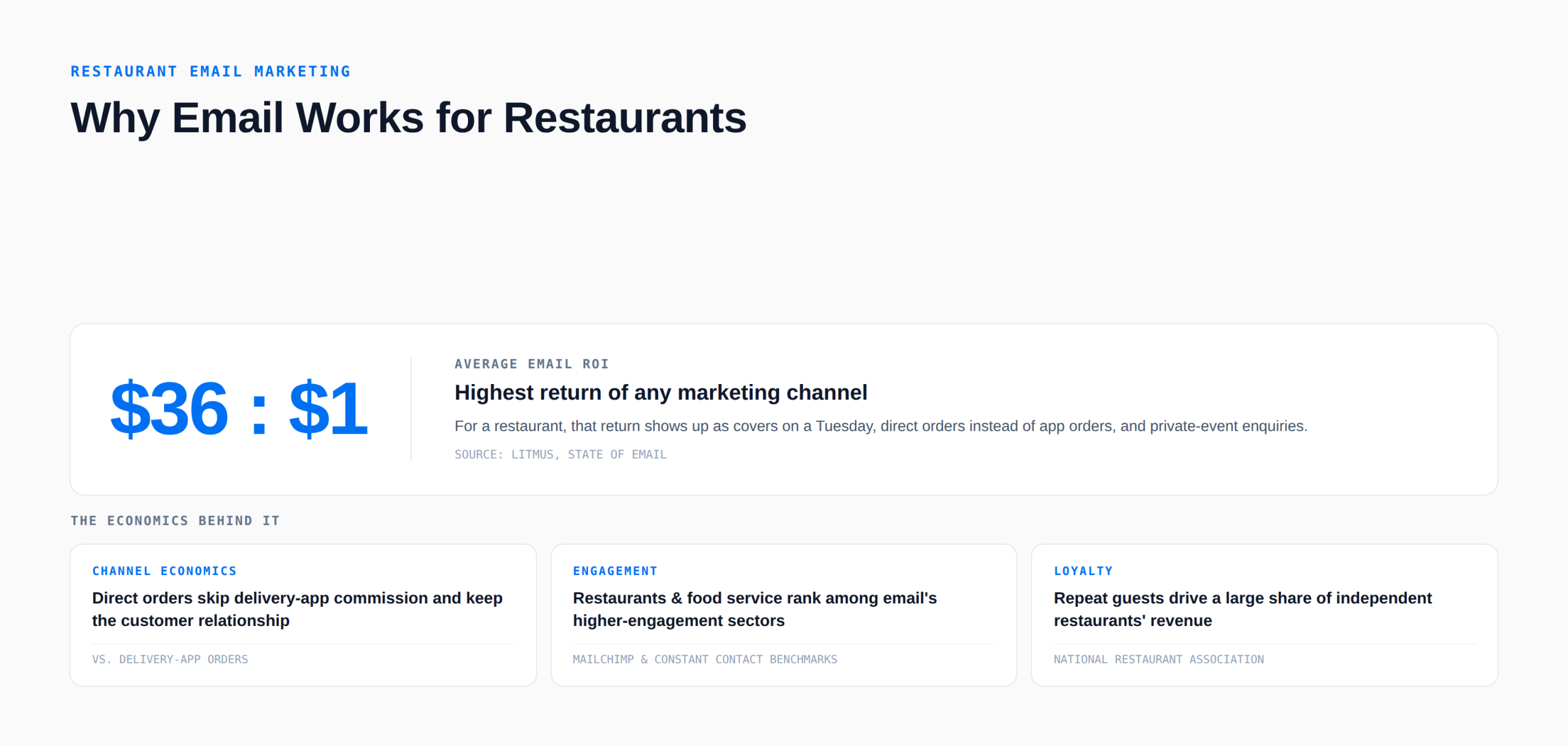
The economics favour email over every other restaurant channel. A delivery-app order costs commission and keeps the customer relationship on the app; a direct order prompted by an email keeps both. A paid social post reaches a slice of followers once; an email reaches the whole list, and industry benchmark reports from Mailchimp and Constant Contact have for years placed restaurants and food service among the higher-engagement sectors, because people like reading about food from places they’ve eaten.
Litmus’s State of Email research puts email’s return at around $36 per $1 spent across industries; for a restaurant, the return shows up as covers on a Tuesday, direct orders instead of app orders, and private-event enquiries. The National Restaurant Association’s industry research has consistently found that loyalty and repeat guests drive a large share of independent restaurants’ revenue, and email is the cheapest way to keep those guests coming back.
What Restaurants Should Send
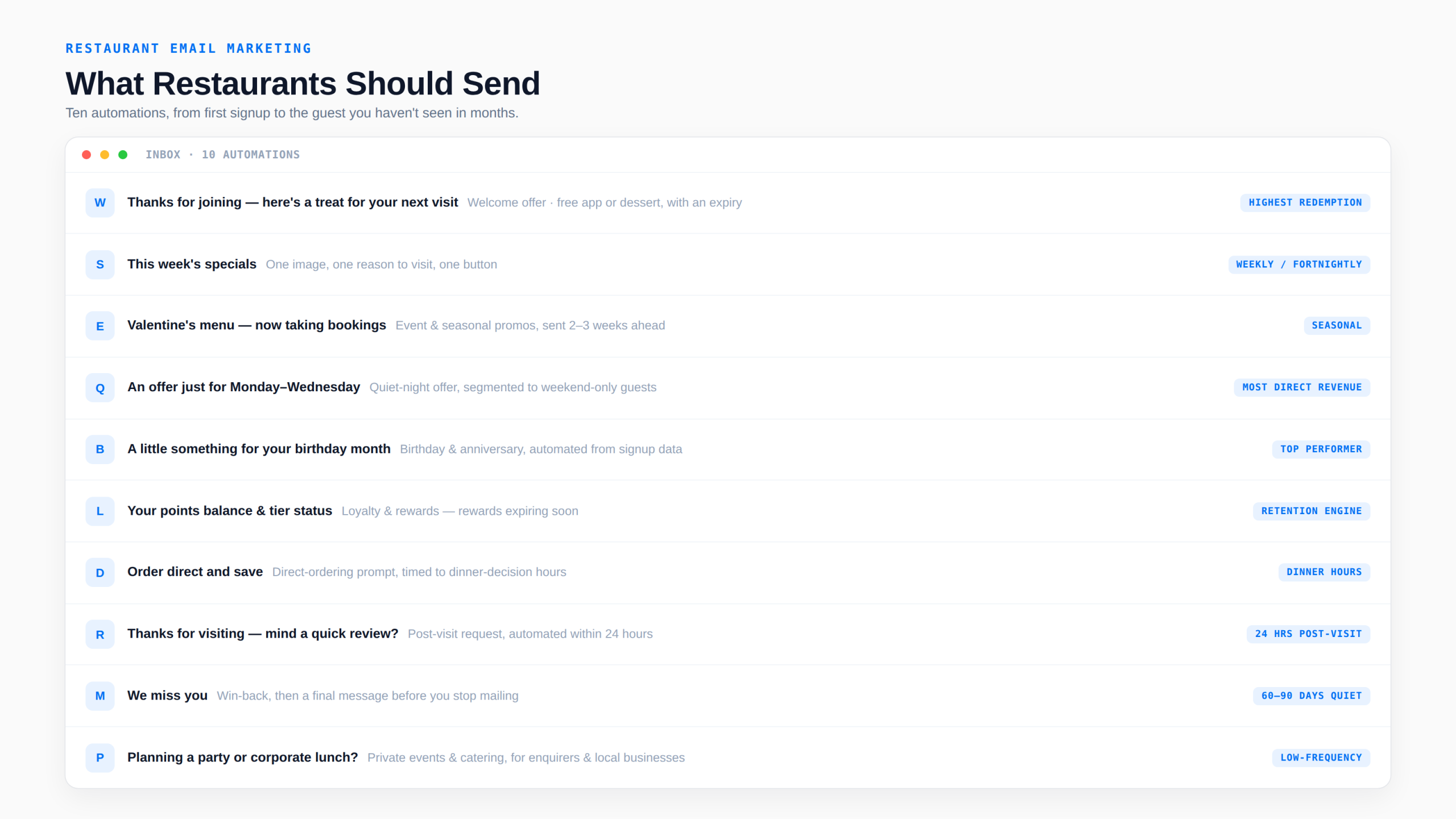
Welcome offer. Immediately after signup: a thank-you and an incentive for the next visit (a free appetiser, dessert, or a small discount) with an expiry. The highest-redemption email a restaurant sends.
Weekly or fortnightly update. Short and visual: this week’s specials, a new dish, an event, a reservation link. One image, one reason to visit, one button.
Event and seasonal promotions. Holiday menus, Valentine’s, Mother’s Day, game nights, live music, wine dinners, pop-ups. Send two to three weeks ahead with a booking link, and a reminder in the final week.
Quiet-night offers. Segmented to guests who visit on weekends: a Monday-to-Wednesday incentive. This is the automation that most directly moves revenue.
Birthday and anniversary. Automated from signup data: a treat during the birthday month. Reliably among the best-performing restaurant emails.
Loyalty and rewards. Points balances, tier status, rewards expiring. If you run a loyalty programme, its email is your retention engine.
Direct-ordering prompts. For restaurants with online ordering: a reminder that ordering direct is cheaper or comes with a perk, timed to dinner-decision hours.
Post-visit review request. Within 24 hours of a reservation or order: a thank-you and a link to the review platform that matters to you. Automate from the reservation or ordering system.
Win-back. Guests who haven’t visited or ordered in 60–90 days: a “we miss you” with an offer, then a final message before you stop mailing.
Private events and catering. A separate, less frequent stream to guests who’ve enquired about or booked events, and to local businesses: seasonal party packages, corporate lunch menus.
Building the List
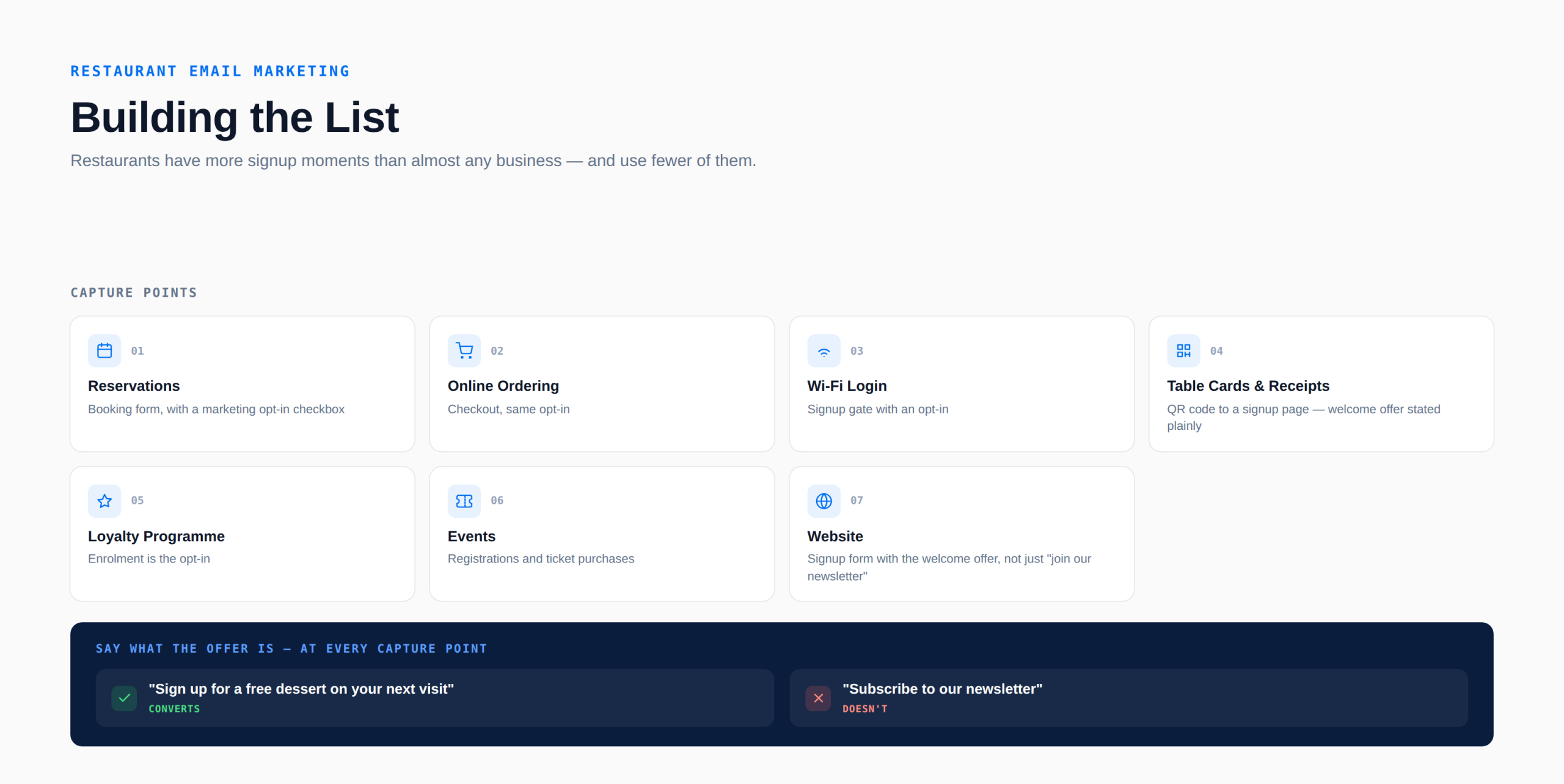
Restaurants have more signup moments than almost any business and use fewer of them. Capture at:
- Reservations. The booking form, with a marketing opt-in checkbox (unchecked by default where consent law requires it).
- Online ordering. The checkout, same opt-in.
- Wi-Fi login. A signup gate with an opt-in.
- Table cards and receipts. A QR code to a signup page with the welcome offer stated plainly.
- Loyalty programme. Enrolment is the opt-in.
- Events. Registrations and ticket purchases.
- Website. A signup form with the welcome offer, not just “join our newsletter”.
Say what the offer is at every capture point. “Sign up for a free dessert on your next visit” converts; “subscribe to our newsletter” doesn’t.
Segmenting Restaurant Guests
- Visit or order recency and frequency: new (one visit), regular (monthly or more), lapsed (60–90+ days). Drives welcome, loyalty, and win-back.
- Day and time of visit: weekend guests versus weekday, lunch versus dinner. Drives quiet-night offers.
- Channel: dine-in, direct online order, delivery-app order (if you capture the address), event.
- Location: for groups with multiple sites.
- Preferences: dietary, cuisine interest, event interest, captured at signup or inferred from orders.
- Engagement: clickers get more offers; non-openers get fewer and a re-permission email.
Most of this data sits in the reservation, ordering, or loyalty system. Connecting it to the email platform (native integration, Zapier, or a weekly export) is the setup that pays for everything else.
Compliance and Deliverability for Restaurants
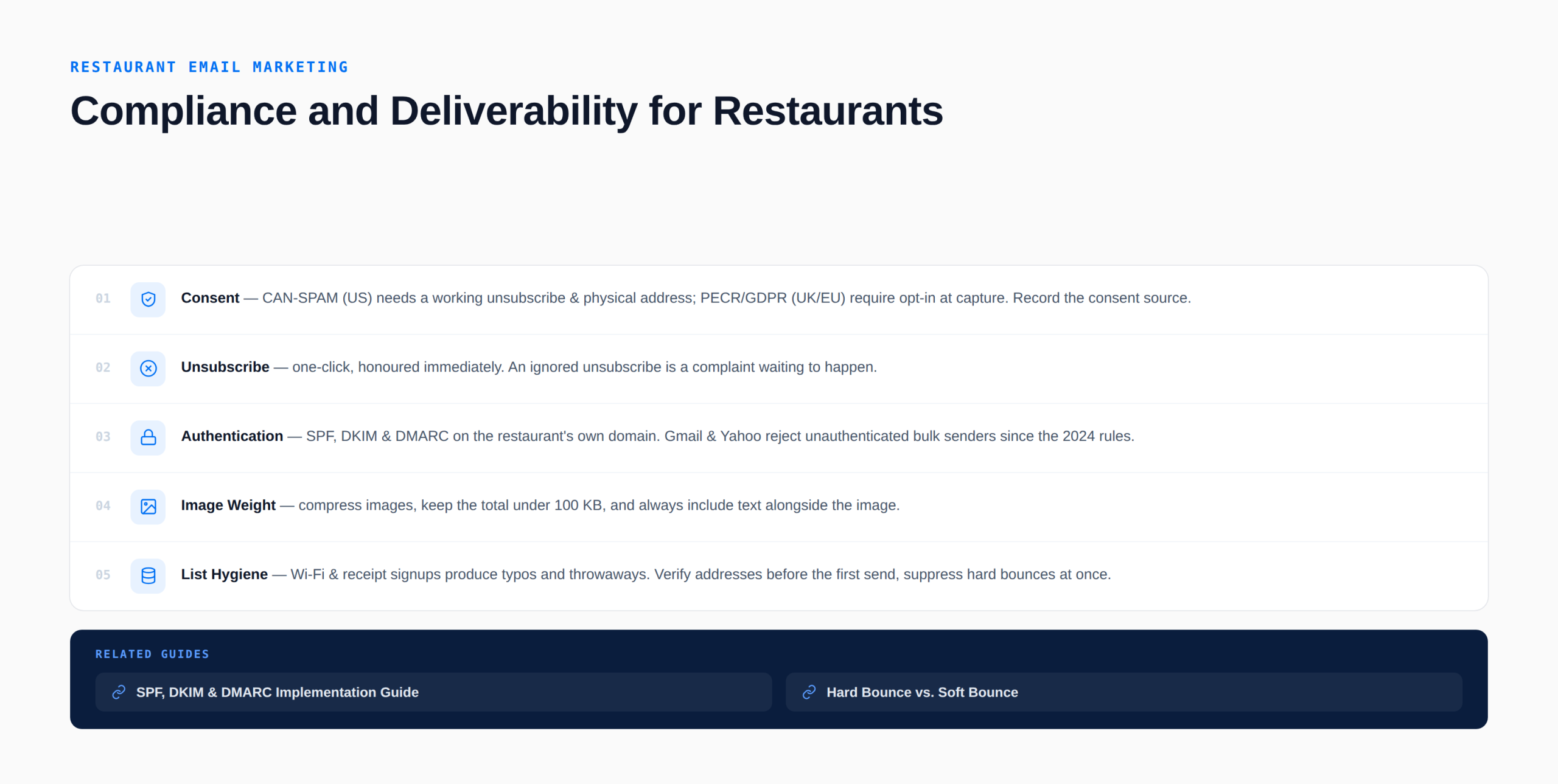
Consent. CAN-SPAM in the US allows marketing to guests with a working unsubscribe and a physical address in every email; UK and EU guests fall under PECR and GDPR, where an opt-in at capture is required. Record the consent source.
Unsubscribe. One-click, honoured immediately. A guest who unsubscribes and keeps receiving offers is a complaint waiting to happen.
Authentication. Send from the restaurant’s own domain with SPF, DKIM, and DMARC configured; since the 2024 Gmail and Yahoo bulk-sender rules, unauthenticated senders are rejected. Our SPF, DKIM and DMARC guide walks through it.
Image weight. Restaurant emails are visual, and heavy images are the most common reason they land in spam or fail to load on mobile. Compress images, keep the total under 100 KB, and always include text with the image.
List hygiene. Wi-Fi and receipt signups produce typos and throwaways. Verify addresses before the first send and suppress hard bounces at once; our hard bounce vs soft bounce post explains which to remove.
Restaurant Email Best Practices
- Lead with the offer or the reason to visit. In the subject line and the first line.
- Send when people decide. Late morning for lunch, mid-afternoon for dinner, Wednesday or Thursday for the weekend.
- Keep it short and mobile-first. One image, two or three sentences, one button (reserve, order, RSVP).
- Automate the welcome, birthday, review, and win-back emails. They run every day without anyone remembering to send them.
- Segment quiet-night offers. Don’t discount the weekend guests who’d come anyway.
- Make ordering direct the better deal. A perk for direct orders beats fighting the apps on price.
- Show the food. Real photos of your dishes outperform stock images every time.
- Sign it. From the chef, the owner, or the manager, with a reply address someone reads.
- Test subject lines. “Free dessert this week” versus “New spring menu is here”. One variable per send.
- Frequency: weekly or fortnightly for the main list; more often only during events or seasons.
Common Mistakes Restaurants Make
- Only sending when there’s a promotion. Guests forget you between sends; a consistent cadence matters more than any single offer.
- Discounting everyone. Quiet-night offers to weekend regulars give away margin for nothing.
- Sending from a free webmail address. No authentication, no unsubscribe, poor deliverability.
- Huge image-only emails. Slow to load, invisible with images off, flagged by spam filters.
- No capture at reservations and ordering. The two largest signup sources, unused.
- Ignoring lapsed guests. A 90-day win-back is far cheaper than a new customer.
- Measuring opens. Unreliable since Apple Mail Privacy Protection; measure clicks, redemptions, reservations, and direct orders.
Tools and Platforms for Restaurant Email Marketing
Restaurants usually choose between the email features built into their reservation, ordering, or loyalty platform (Toast, Square, OpenTable, Resy, and similar all offer some email) and a general email platform connected to those systems. Built-in tools are convenient for basic sends; a dedicated platform gives better design, segmentation, automation, and deliverability, and is where most restaurants end up once email becomes a real channel.
| Platform | Best For | Free Plan | Starting Price | Why for restaurants |
|---|---|---|---|---|
| Mailercloud#1 Pick | Independents & small groups | ✓ Yes 1,000 contacts | $10/mo | Automations, QR forms, visual builder, Inbox Tracker at low cost |
| Mailchimp | POS & ordering integrations | ✓ Yes 250 contacts | $13/mo | Native Square and partner integrations; food-friendly templates |
| Constant Contact | Events + phone support | ✗ Trial Free trial | $12/mo | Wine dinners and classes; automation on Premium ($80/mo) |
| Brevo | Email + SMS same-day offers | ✓ Yes 300/day | ~$9/mo | SMS and WhatsApp; unlimited contacts; automation on Standard |
| Toast / Square / OpenTable | Basic sends from guest data | Bundled Per location | Bundled | Convenient, limited design and segmentation |
Pricing verified September 13–14, 2026 on each platform’s official pricing page, monthly billing unless noted.
Mailercloud
Mailercloud fits independent restaurants and small groups that want the welcome, birthday, quiet-night, review, and win-back automations on a hospitality budget: free for 1,000 contacts and 12,000 emails a month, then $10/month for 5,000 contacts with unlimited sends. The drag-and-drop email builder handles food-forward, mobile-first designs; the visual automation builder runs date and behaviour triggers; segmentation covers visit recency and day-of-week once the POS or reservation data is mapped; the signup form builder powers QR-code and Wi-Fi capture; and Inbox Tracker shows whether a Thursday offer landed in the inbox or Promotions across Gmail, Outlook, and Yahoo. Limitations: no native POS, reservation, or ordering integrations (Zapier, Make, or CSV), a smaller integration library than Mailchimp, and native SMS still in development, which matters for same-day offers.
✅Mailercloud Pros:
- Free for 1,000 contacts; $10/month for 5,000 contacts with unlimited sends — fits a hospitality budget
- Drag-and-drop builder for food-forward, mobile-first emails
- Visual automation builder for welcome, birthday, review, and win-back sequences
- Segmentation by visit recency and day-of-week once POS or reservation data is mapped
- Signup form builder for QR-code and Wi-Fi capture
- Inbox Tracker shows whether a Thursday offer landed in the inbox or Promotions
- Built-in email verifier for typo-prone in-venue signups
- 24/7 live chat support
❌Mailercloud Cons:
- No native POS, reservation, or ordering integrations (Zapier, Make, or CSV)
- Smaller integration library than Mailchimp
- Native SMS still in development — same-day offers need a separate tool
💰Pricing: Free for up to 1,000 contacts. Premium from $10/month (5,000 contacts, unlimited sends).
Mailchimp
Mailchimp integrates natively with Square, Toast (via partners), and many ordering and reservation tools, and its templates suit food photography. Pricing rises with list size and it bills for unsubscribed contacts unless archived.
Constant Contact
Popular with independent restaurants for simplicity, event tools (wine dinners, classes), and phone support on every plan. No free plan, and multi-step automation requires Premium ($80/month).
Brevo
Brevo adds SMS and WhatsApp for same-day offers, prices by volume with unlimited contacts, and includes a CRM. Automation arrives on Standard; the free plan’s 300-a-day cap rules out real sends.
Built-in tools (Toast, Square, OpenTable, Resy)
Convenient because the guest data is already there, with basic templates and automated campaigns. Design, segmentation, and deliverability control are limited compared with a dedicated platform, and pricing is usually bundled or per-location.
Restaurant Email Metrics
- Offer redemption rate: redemptions ÷ offers sent, per campaign and automation; tracked by unique codes or POS.
- Reservations and direct orders from email: via tracked links; the primary outcome.
- Click-through rate: the engagement signal; opens are unreliable.
- Quiet-night lift: covers on promoted nights versus baseline.
- Win-back rate: lapsed guests returning ÷ win-back emails sent.
- Review conversion: reviews ÷ requests.
- List growth by source: reservations, ordering, Wi-Fi, QR, events.
- Unsubscribe and complaint rates: under 0.5% and 0.1%; a rise usually means too many discounts to the wrong segment.
- Inbox placement: for offers that must arrive before the decision hour.
How to Get Started: A 7-Step Plan
- Turn on capture at reservations, ordering checkout, Wi-Fi, and table QR codes, each with a stated welcome offer.
- Choose a platform, connect your POS or reservation data, and authenticate your domain.
- Build the welcome automation with the offer and an expiry.
- Add birthday, post-visit review, and 90-day win-back automations.
- Send a weekly or fortnightly update with one reason to visit.
- Add a quiet-night offer segmented to weekend guests.
- Track redemptions, reservations, and direct orders monthly.
Frequently Asked Questions
What is restaurant email marketing?
Restaurant email marketing is permission-based email to guests and prospects, built from reservation, ordering, loyalty, Wi-Fi, and in-venue signups, that drives reservations, direct online orders, event bookings, and repeat visits through welcome offers, regular updates, seasonal promotions, birthday and loyalty messages, review requests, and win-back campaigns.
How do restaurants build an email list?
Restaurants build email lists by adding an opt-in to reservation and online-ordering forms, gating Wi-Fi with a signup, placing QR codes on table cards and receipts that lead to a signup page with a stated welcome offer, enrolling loyalty members, and capturing event registrations, always stating the incentive rather than asking guests to “join a newsletter”.
What should a restaurant email newsletter include?
A restaurant email should include one real photo of the food, two or three sentences on the week’s specials, a new dish, or an event, and a single button to reserve, order, or RSVP, sent from a named person at the restaurant with a compliant footer; short, visual, mobile-first emails with one clear reason to visit outperform long newsletters.
How often should restaurants send emails?
Most restaurants should email their main list weekly or fortnightly, with automated welcome, birthday, review-request, and win-back emails running in addition based on each guest’s behaviour, and extra sends only around events and seasons; unsubscribe rates above 0.5% signal too much frequency or too many discounts to the wrong segment.
Does email marketing work for restaurants?
Yes, email marketing works for restaurants because it reaches every guest who opted in at no per-send cost, keeps the customer relationship away from delivery apps that take 15–30% commission, and drives measurable reservations, direct orders, and quiet-night covers; restaurants and food service rank among the higher-engagement sectors in Mailchimp’s and Constant Contact’s benchmark reports.
What is the best email marketing platform for restaurants?
The best email platform for a restaurant is one that connects to its reservation or POS data and runs welcome, birthday, review, and win-back automations affordably; Mailercloud suits independents and small groups at $10/month with a drag-and-drop builder, automations, forms for QR capture, and Inbox Tracker, Mailchimp has the widest native POS integrations, and Constant Contact suits owners who want phone support and event tools.
How can restaurants reduce delivery app commissions with email?
Restaurants reduce delivery-app commissions by capturing guest emails at every touchpoint and using email to make direct ordering the better deal, through a direct-order perk, timely prompts during decision hours, and a loyalty programme that rewards direct orders, so that repeat orders move from the app, where the restaurant pays 15–30% commission, to the restaurant’s own ordering page.
Summary
Restaurant email marketing works because it’s the one channel a restaurant owns. Capture addresses at reservations, ordering, Wi-Fi, and the table with a stated welcome offer; automate the welcome, birthday, review, and win-back emails; send a short, visual update weekly or fortnightly with one reason to visit; segment quiet-night offers to weekend guests; make direct ordering the better deal; authenticate your domain; and measure redemptions, reservations, and direct orders rather than opens.

As a Marketing Director, I develop and implement marketing strategies, conduct market research, and manage a team of marketing professionals. With a successful track record of launching campaigns that drive revenue growth, I bring my marketing expertise to blog writing, creating engaging content that promotes the brand and its products/services.