
Last updated: June 2026 · Tested by our editorial team using real subscriber lists and live campaigns
GetResponse and Mailchimp are both established marketing platforms, but GetResponse pushes further into conversion tools while Mailchimp stays focused on approachable email marketing. GetResponse bundles webinars, sales funnels, and deep automation; Mailchimp leads on ease of use and brand familiarity.
We built the same campaigns, automations, and funnels in both to see which delivers more in 2026.
Below is our full 8-round breakdown with a winner each round and a running score. The Quick Answer and final scoreboard summarize it if you are short on time.
Quick Answer: GetResponse wins on automation, webinars, and funnels; Mailchimp wins on ease of use, templates, and brand ecosystem. Choose GetResponse if you want conversion tools — automation, webinars, and sales funnels — in one platform. Choose Mailchimp if you want the friendliest setup, polished templates, and the largest integration marketplace. GetResponse edges the overall comparison on features, while Mailchimp is the simpler starting point.
Table of Contents
GetResponse vs Mailchimp: At a Glance
| Feature | GetResponse | Mailchimp |
|---|---|---|
| Starting Price | $19/mo (Email Marketing) | $13/mo (Essentials) |
| Free Plan | 500 contacts limited features |
250 contacts 500 sends/mo |
| Automation | Advanced workflows | Customer Journey Builder |
| Webinars | ✓ Built-in | ✗ |
| Sales Funnels | ✓ Conversion funnels | Basic |
| Templates | Good | More polished |
| Ease of Use | Moderate | Beginner-friendly |
| Integrations | Solid | Largest marketplace |
| Support | 24/7 Email + Chat | Email + Chat; phone $350+/mo |
Pricing verified 2026. Entry-level paid plans shown.
Round 1: Ease of Use and Onboarding
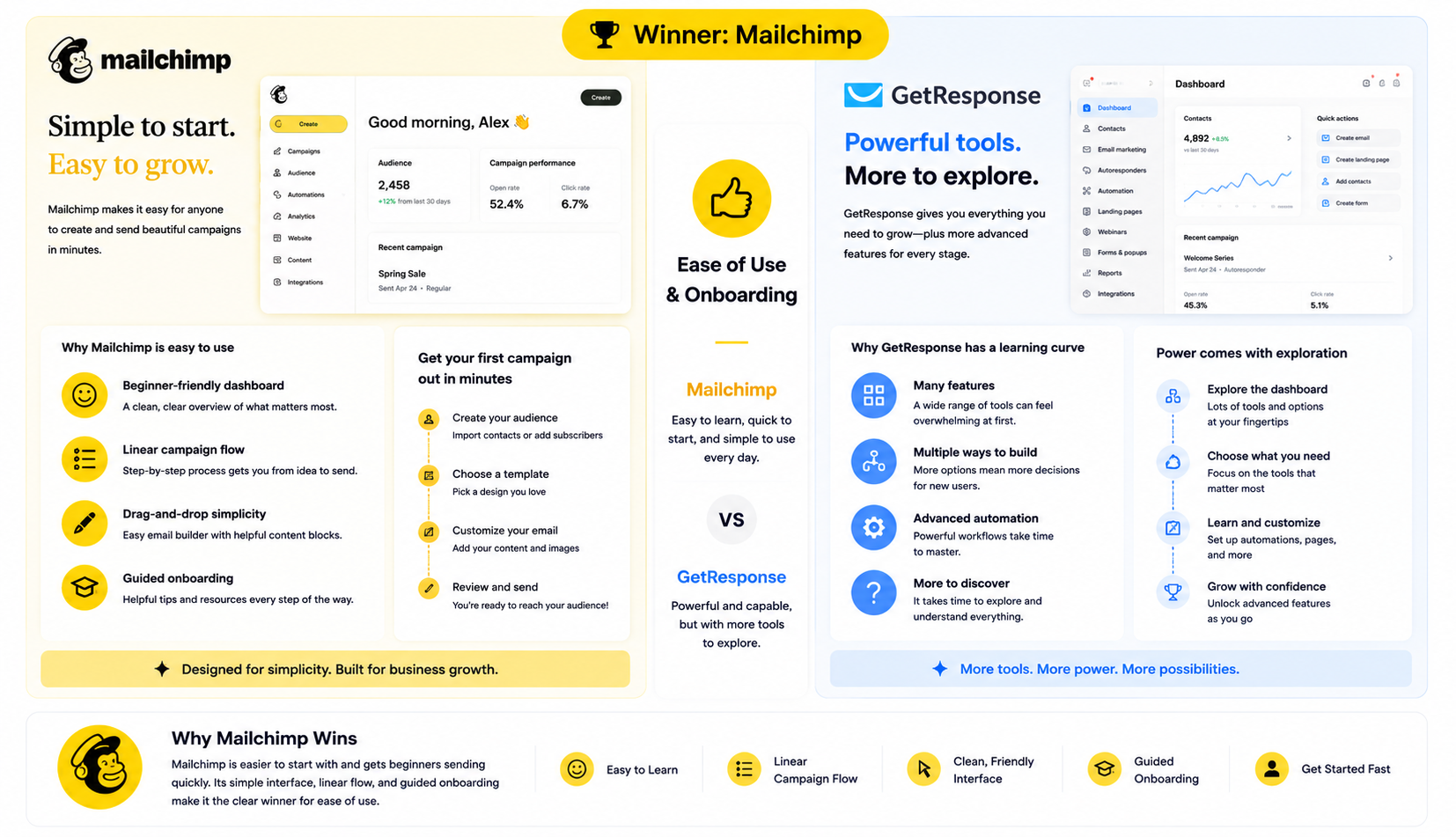
Winner: Mailchimp
Mailchimp is the easier tool to start with, with a friendly dashboard and a linear campaign flow that gets beginners sending quickly.
GetResponse is capable but its breadth of tools makes the interface busier at first. Mailchimp wins onboarding.
Round 2: Email Editor and Templates
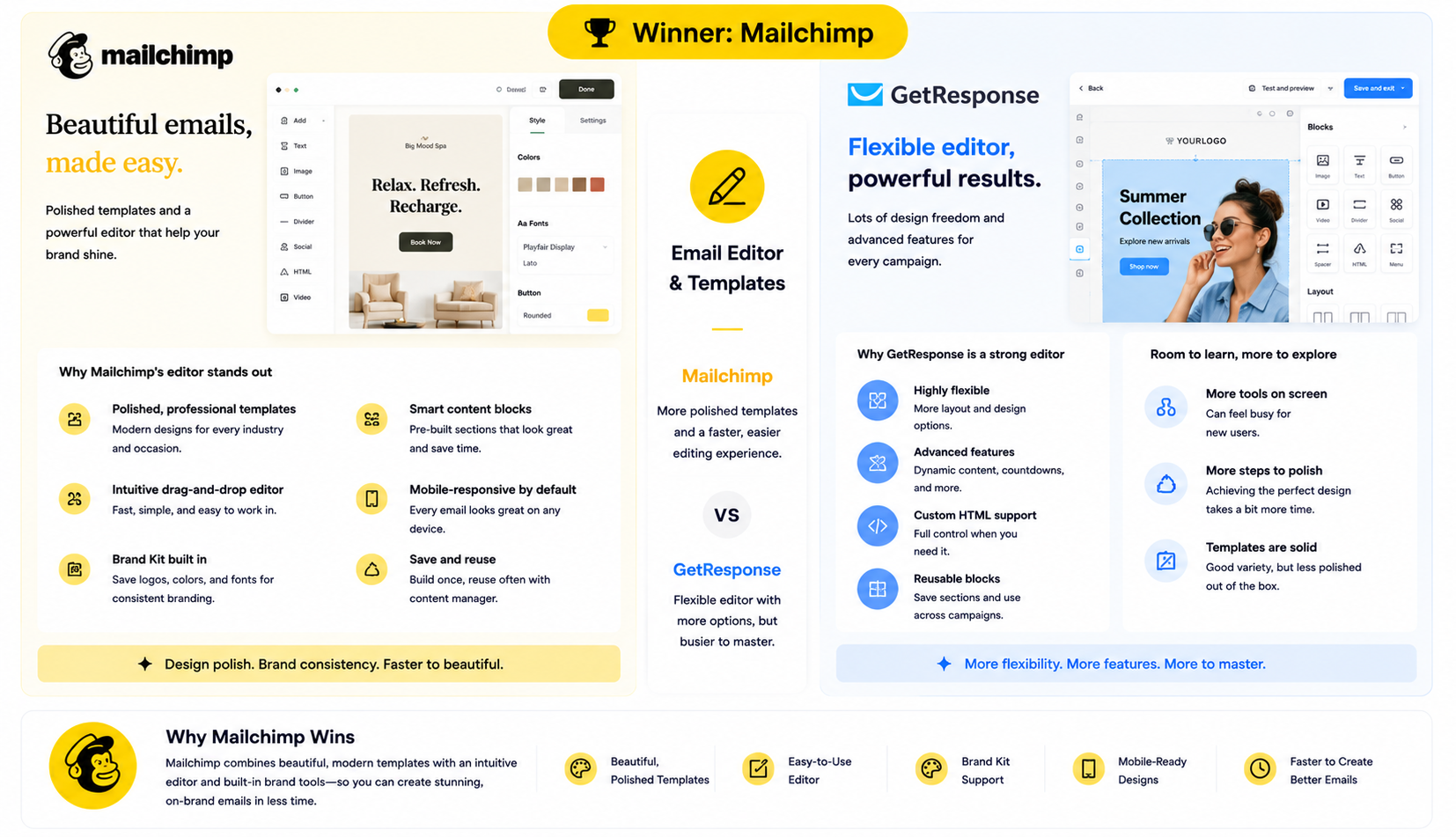
Winner: Mailchimp
Mailchimp’s templates are more polished and its editor is quick to work in, with strong brand-kit support.
GetResponse’s editor is solid and flexible, but Mailchimp’s design polish out of the box gives it the round.
Round 3: Automation and Workflows
Winner: GetResponse
GetResponse’s automation builder supports advanced, condition-based workflows with scoring, tagging, and event triggers that go beyond everyday email.
Mailchimp’s Customer Journey Builder covers common automations but gates depth behind higher tiers. For automation capability, GetResponse wins.
Round 4: Webinars and Funnels
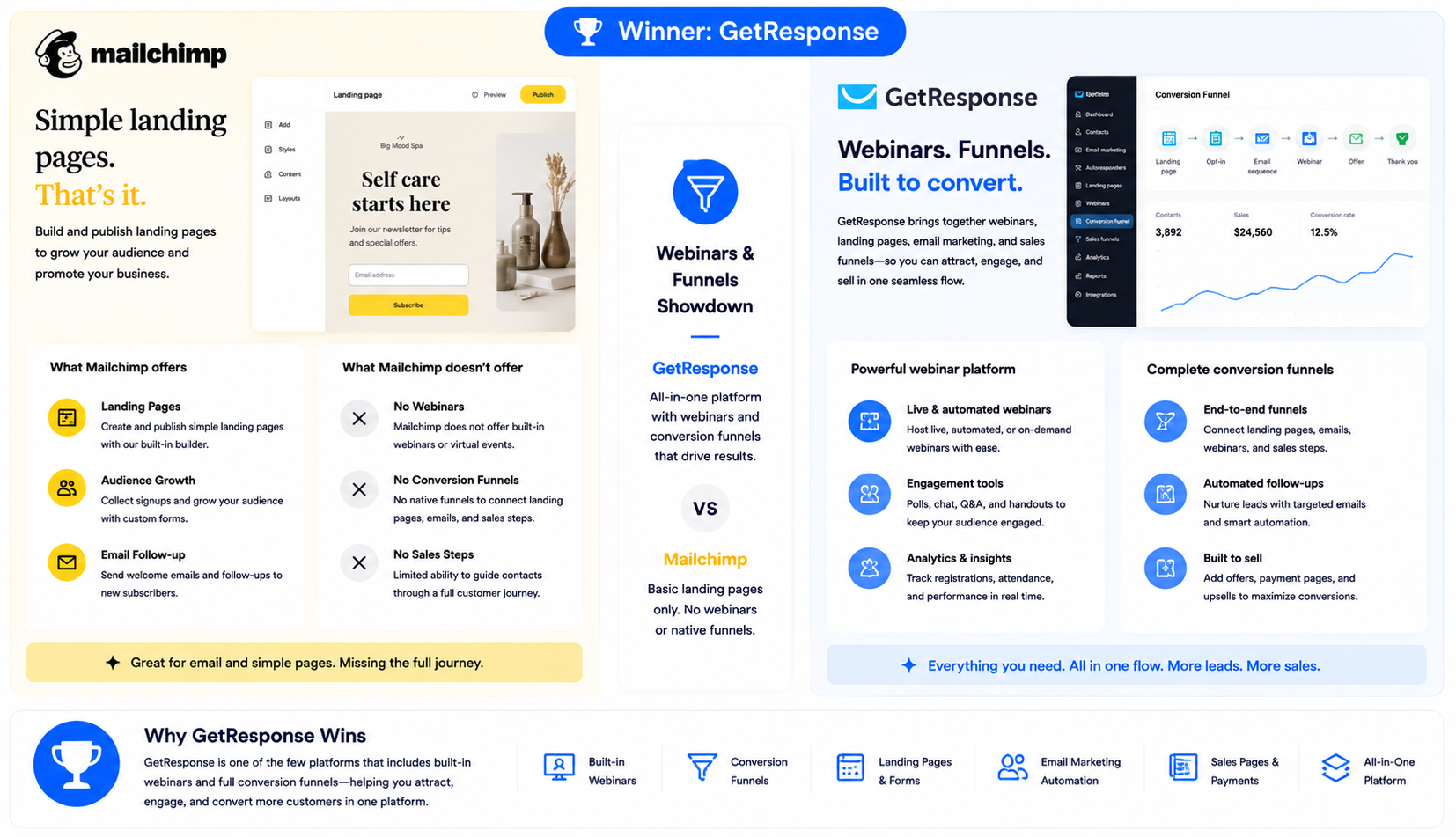
Winner: GetResponse
GetResponse is unusual in bundling built-in webinars and conversion funnels that connect landing pages, emails, and sales steps in one flow — useful for course creators, coaches, and B2B lead gen.
Mailchimp has basic landing pages but no native webinars or full conversion funnels. GetResponse wins this round clearly.
Round 5: Segmentation and Personalization
Winner: GetResponse
GetResponse segments on behavior, tags, scoring, and custom fields, and lets you combine conditions into dynamic audiences for targeted sends.
Mailchimp offers good segmentation, with the richest options on paid tiers, but GetResponse’s tag-and-score model wins the round.
Round 6: Deliverability
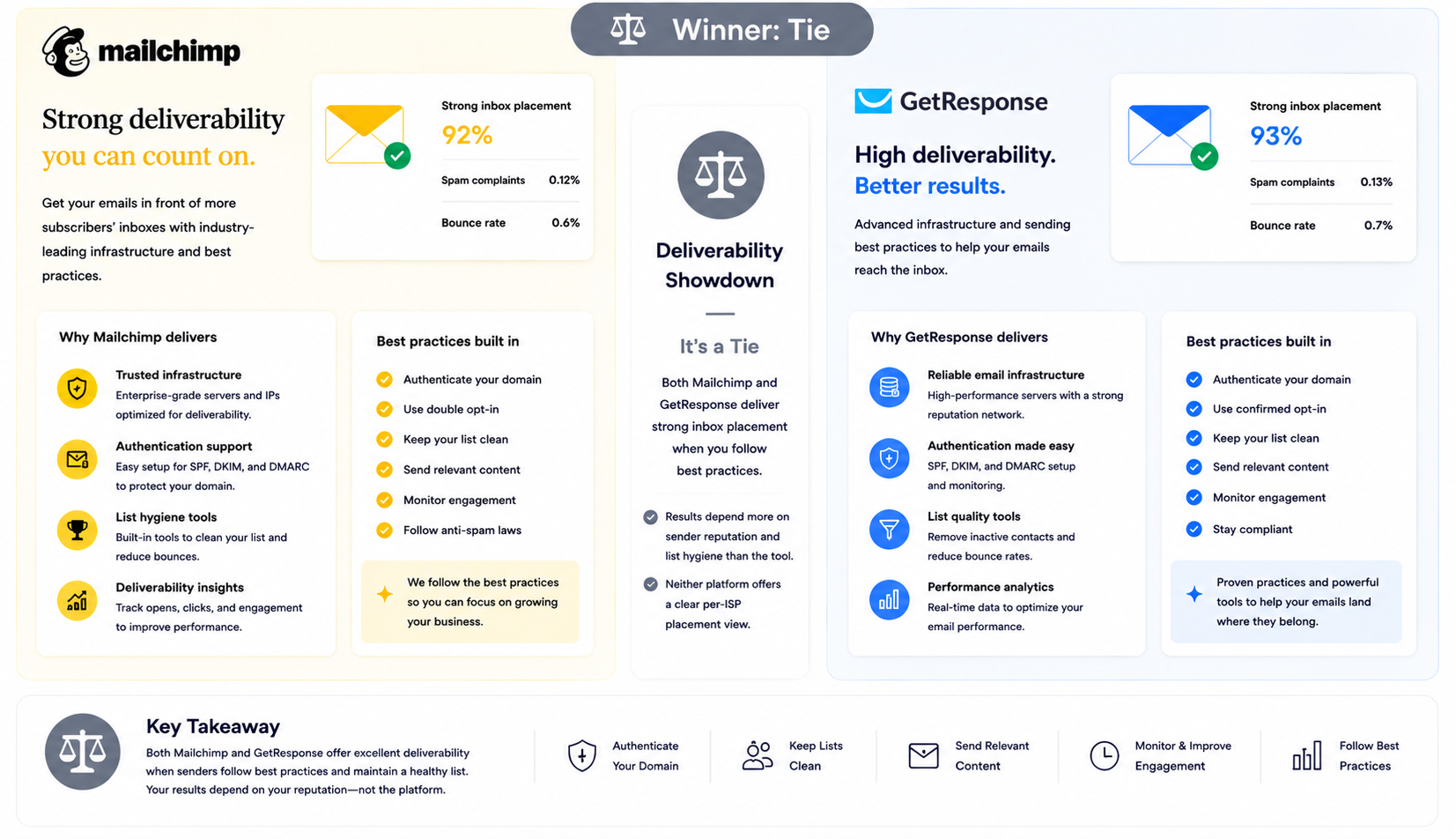
Winner: Tie
Both platforms achieve solid inbox placement when senders authenticate properly and maintain list hygiene, with results varying more by sender reputation than the tool.
Neither offers a clear per-ISP placement view, so deliverability is a tie.
Round 7: Reporting and Analytics

Winner: GetResponse
GetResponse ties reporting to its funnels and automations, so you can see how a sequence or funnel contributes to conversions, not just opens and clicks.
Mailchimp’s reporting is mature and strong for connected-store revenue, but GetResponse’s conversion-focused analytics give it the edge for funnel-driven teams.
Round 8: Pricing and Value
Winner: Mailchimp
For simple email at low volume, Mailchimp is cheaper to start and its tiers are easy to predict.
GetResponse’s value shows once you use its webinars and funnels, but for basic email Mailchimp delivers more for less. Mailchimp takes the value round for simple use.
Final Scoreboard: GetResponse 4, Mailchimp 3 (1 tie)
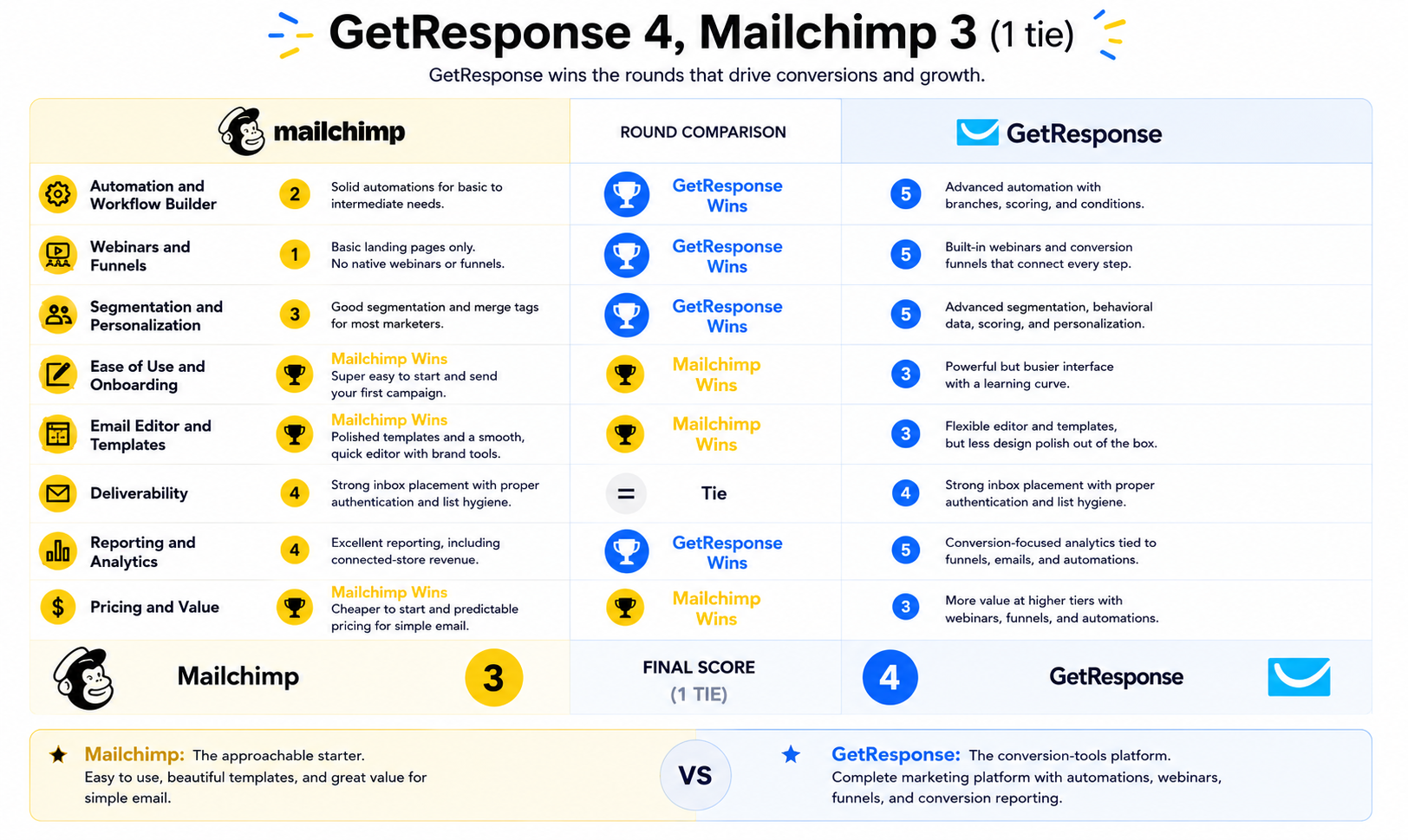
GetResponse wins automation, webinars and funnels, segmentation, and conversion reporting — the rounds that matter for marketers running full campaigns. Mailchimp wins ease of use, templates, and entry pricing, with deliverability tied.
The result fits the intent: GetResponse is the conversion-tools platform, Mailchimp is the approachable starter. Your need for funnels and automation versus simplicity decides it.
GetResponse Pros and Cons
GetResponse
✓Pros:
- Advanced automation with scoring, tagging, and event triggers
- Built-in webinars — rare in an email platform
- Conversion funnels connecting pages, emails, and sales steps
- Tag-and-score segmentation
- 24/7 email and chat support
- Good landing page and form builders
✗Cons:
- Busier interface than Mailchimp
- Templates less polished than Mailchimp
- Can be more platform than a simple newsletter needs
- Smaller integration marketplace than Mailchimp
💰Pricing: Free plan for up to 500 contacts with limited features. Email Marketing starts around $19/month; Marketing Automation and higher tiers add webinars and funnels; pricing scales with contacts. Verified 2026.
Mailchimp Pros and Cons
Mailchimp
✓Pros:
- Beginner-friendly with a fast first-campaign experience
- Polished, modern templates and brand-kit support
- Free plan available for small lists
- Largest app marketplace in the category
- Mature reporting with store revenue tracking
- Strong brand recognition and documentation
✗Cons:
- No native webinars or full conversion funnels
- Automation depth trails GetResponse
- Free plan reduced to 250 contacts / 500 sends in 2026
- Phone support only on $350+/month plans
- Bills by contacts stored, including non-engaging ones on some plans
💰Pricing: Free plan: 250 contacts / 500 sends per month. Essentials starts around $13/month; Standard and Premium scale with contacts and features. Verified 2026.
Which Should You Choose?
Choose GetResponse if:
- You want automation, webinars, and sales funnels in one platform.
- You run courses, coaching, or B2B lead generation.
- You rely on tag-and-score segmentation and conversion reporting.
- You want 24/7 support included.
Choose Mailchimp if:
- You want the friendliest setup and the most polished templates.
- You send mostly newsletters or simple campaigns.
- You value a large integration marketplace and brand familiarity.
- You have a small list and want a free or low-cost plan.
Neither feels right?
Both tools in this comparison have real trade-offs — steep pricing as your list grows, features gated behind higher tiers, or paying for contacts who never open your emails. If your main job is email marketing and you want more value for the money, it is worth looking at a third option.
Mailercloud starts at $7/month with a free plan covering 1,000 contacts and 12,000 emails/month — see our pricing. It includes an Inbox Tracker that shows exactly where your emails land across 15+ ISPs, plus AMP for Email, visual automation, A/B testing, segmentation, and 24/7 live chat on every plan, including free. The trade-off is a smaller integration library and lower brand recognition — but for pure email marketing value, it is hard to beat at the price.
How to Switch Between GetResponse and Mailchimp
Switching between GetResponse and Mailchimp starts with exporting contacts as a CSV from the source platform, including tags and consent status, then importing into the new tool and mapping fields on upload.
Rebuild your automations first, then segments and templates, which both tools accept as custom HTML. If you move to GetResponse, recreate any funnels and webinar registrations; if you move to Mailchimp, audit your contact count since it drives the bill.
FAQ
Is GetResponse better than Mailchimp?
GetResponse is better than Mailchimp for marketers who want automation, webinars, and sales funnels in one platform. Mailchimp is better for ease of use, polished templates, and the largest integration marketplace. The right pick depends on whether you need conversion tools or a simple, approachable email tool.
Is GetResponse cheaper than Mailchimp?
For simple email at low volume, Mailchimp is cheaper to start. GetResponse costs more but bundles webinars and funnels that would otherwise require separate tools, so it can be better value if you use those features. Compare your feature needs, not just the entry price.
Can I migrate from Mailchimp to GetResponse?
Yes. Export your Mailchimp audience as a CSV with tags and consent status, import it into GetResponse, and rebuild your automations, segments, and templates. Recreate any funnels and webinar registrations separately. Most migrations take a few days depending on complexity.
Does Mailchimp have webinars or funnels like GetResponse?
No, Mailchimp does not offer native webinars or full conversion funnels; it has basic landing pages. GetResponse bundles built-in webinars and funnels, which makes it the stronger choice for course creators, coaches, and conversion-focused marketers.
What is the main difference between GetResponse and Mailchimp?
The main difference is scope. GetResponse is a conversion platform with automation, webinars, and sales funnels. Mailchimp is an approachable email marketing tool focused on ease of use, templates, and integrations rather than built-in conversion tools.
Is there a cheaper alternative to both GetResponse and Mailchimp?
Yes. Mailercloud starts at $7/month with a free plan for 1,000 contacts and 12,000 emails per month, and is worth evaluating if email marketing value is your priority. Brevo and MailerLite are also lower-cost options to compare.
Final Verdict
GetResponse edges this matchup on features, winning automation, webinars and funnels, segmentation, and conversion reporting, and is the right call for marketers who want conversion tools in one place.
Mailchimp is the simpler starting point, with easier setup, polished templates, and a large integration marketplace. Match the tool to whether you need funnels and automation or approachable simplicity.

An SEO expert with a focus on on-page optimization, technical SEO, and keyword research. Dedicated to helping businesses improve search rankings and grow their online presence through data-driven strategies.