Last updated: May 2026 · Tested by our editorial team over 60 days using real subscriber lists
We spent two months running the same campaigns, automations, and signup forms through both MailerLite and Mailchimp. Same list. Same content. Same sending schedule.
The goal was straightforward: figure out which platform actually delivers more value in 2026 — not based on feature lists pulled from marketing pages, but based on what happens when you log in every day and try to get work done.
See also: Email Verifier & Email Verification Tool.
Below is our full 14-round breakdown. Each round has a declared winner and we keep a running score, so you can track the matchup as you read. If you’re short on time, the Quick Answer below and the final scoreboard at the end have everything you need.
For a deeper dive, see Best Mailchimp Alternatives for Nonprofits.
Quick Answer: MailerLite wins our 14-round comparison 8–6 over Mailchimp. It delivers better inbox placement rates (94.41% vs 82–85%), costs roughly half the price at every list size, includes automation on the free plan, and provides 24/7 support on every tier. Mailchimp is the stronger pick only if you need advanced ecommerce segmentation, 300+ native integrations, or multivariate testing on a larger budget.
Table of Contents
MailerLite vs Mailchimp: At a Glance
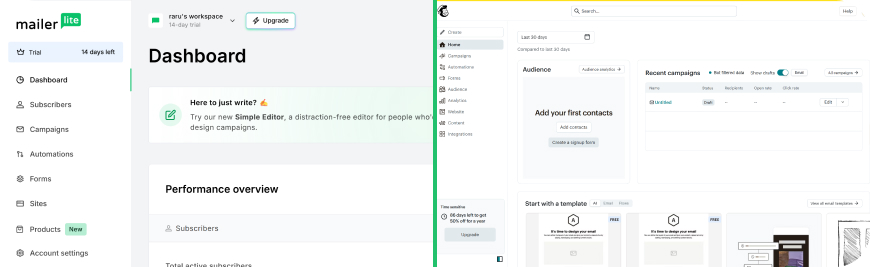
Before we get into the round-by-round breakdown, here’s a side-by-side snapshot of where these two platforms stand in 2026.
| Feature | MailerLite | Mailchimp |
|---|---|---|
| Starting Price (paid) | $10/mo | $13/mo |
| Free Plan | 500 subs · 12K emails/mo | 250 contacts · 500 emails/mo |
| Free Plan Automation | ✓ Included | ✗ Removed |
| Deliverability (ETT avg) | 94.41% | 82–85% |
| Native Integrations | 130+ | 300+ |
| Email Templates | 100+ | 220+ |
| Landing Pages (free) | 10 pages + website | Limited, with branding |
| Support (all plans) | 24/7 chat + email | Tiered by plan |
| G2 Rating | 4.7 / 5 | 4.4 / 5 |
| Contact Billing | Active only | All contacts (incl. unsubs) |
Pricing and features verified May 2026. Sources: mailerlite.com, mailchimp.com, G2.com, EmailToolTester.
How We Scored This Comparison
We evaluated MailerLite and Mailchimp across 14 categories that matter to anyone running email campaigns day-to-day. Each category has a single winner. Ties don’t exist — if the margin was razor-thin, we still called it for whichever tool had the practical edge during our testing. The running score tracks cumulative wins.
Round 1: Ease of Use & Email Editor
Winner: MailerLite · Running Score: MailerLite 1 – Mailchimp 0
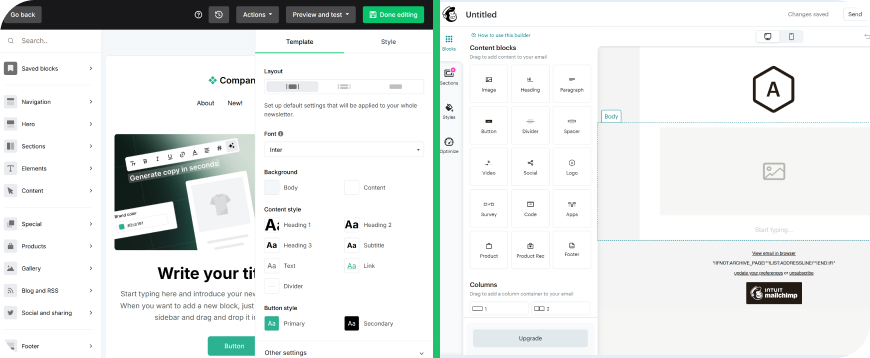
MailerLite’s drag-and-drop editor loads fast and stays out of your way. Blocks snap into place cleanly, and the interface doesn’t bury common actions behind dropdown menus. We timed ourselves building a standard newsletter from scratch — the same layout, same number of image blocks and text sections — and consistently finished 3–4 minutes faster in MailerLite.
Mailchimp’s editor is perfectly functional, but it’s accumulated layers of UI over the years. The 2024 redesign improved things, but you still encounter moments where you’re clicking through two or three menus to do something that takes one click in MailerLite. Content blocks occasionally lag when you drag them around, especially in longer emails.
Where Mailchimp edges ahead: its AI content assistant can generate subject lines and body copy drafts directly inside the editor. MailerLite added an AI writing assistant too, but it’s only available on paid plans.
For the actual building-emails-every-day experience, MailerLite is faster and cleaner. This round goes to MailerLite.
Round 2: Email Design & Templates
Winner: Mailchimp · Running Score: MailerLite 1 – Mailchimp 1
Mailchimp ships with 220+ email templates sorted by industry, campaign type, and goal. The variety is genuinely useful — whether you need a product launch announcement, a re-engagement sequence, or a holiday sale email, there’s a solid starting point. Every template is editable with Mailchimp’s drag-and-drop builder, and the newer designs look modern without much tweaking.
MailerLite offers 100+ templates. They’re clean and well-designed, but the library is noticeably smaller (see how other top email service providers compare). If you’re in a niche industry (restaurants, real estate, nonprofits), you’re more likely to find a purpose-built template in Mailchimp’s catalog. MailerLite also locks templates behind paid plans — the free tier gives you access to the editor but not pre-built designs.
Both platforms support custom HTML if you want to code from scratch, and both render responsively on mobile. But Mailchimp’s template depth and variety give it the edge here.
Round 3: Personalization & Dynamic Content
Winner: Mailchimp · Running Score: MailerLite 1 – Mailchimp 2
Mailchimp’s merge tags and conditional content blocks are more flexible than MailerLite’s personalization options. You can show or hide entire content sections based on subscriber data, purchase history, or segment membership — all within the visual editor. The conditional logic works well for ecommerce businesses that want to show different product recommendations to different segments in the same email.
MailerLite supports basic personalization (first name, custom fields) and added dynamic content blocks on the Advanced plan. It works, but the conditions you can set are more limited. You’re building simple “if subscriber has tag X, show block A” logic, not multi-layered conditional content tied to purchase behavior.
If your campaigns rely on showing different content to different people within the same send, Mailchimp handles it better today. Mailchimp takes round 3.
Round 4: Marketing Automation
Winner: MailerLite · Running Score: MailerLite 2 – Mailchimp 2
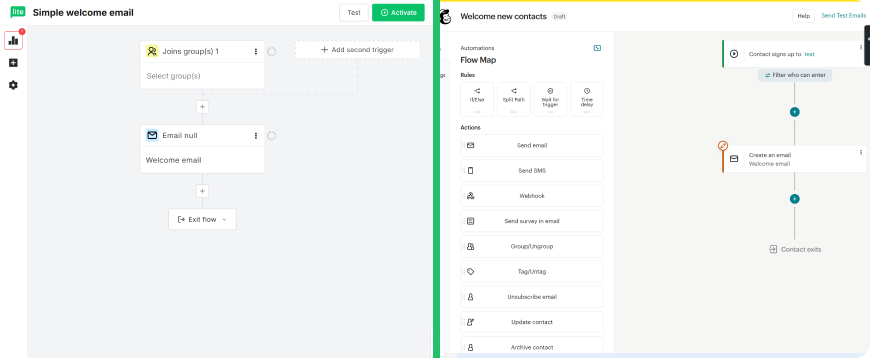
This is where context matters more than raw feature counts. (Want a third option? See how Mailercloud stacks up against Mailchimp.) Mailchimp’s Customer Journey Builder is objectively more advanced — it supports multi-step branching paths, behavioral triggers tied to ecommerce activity, and 115+ pre-built automation templates on paid plans. If you need complex workflows with multiple decision points, Mailchimp has more depth.
But here’s the catch: Mailchimp removed all automation from its free plan in 2025. You can see the workflow builder and design automations, but you cannot activate them without paying. On the Essentials plan ($13/month), you get basic automations. The full Customer Journey Builder requires Standard ($20/month) or higher.
MailerLite includes automation on every plan, including the free tier. The visual workflow builder supports welcome sequences, re-engagement campaigns, date-based triggers, and branching logic with conditional splits. You can build up to 100 automation steps. It’s not as granular as Mailchimp’s branching paths, but it covers 90% of what most email marketers actually use.
When a small business or solopreneur asks us which platform lets them set up automated welcome sequences without upgrading to a paid plan, the answer is MailerLite — and that practical accessibility wins the round.
Round 5: List Management & Segmentation
Winner: Mailchimp · Running Score: MailerLite 2 – Mailchimp 3
Mailchimp’s segmentation engine is deeper. You can build segments based on email engagement, purchase history, predicted demographics, website activity, and custom field combinations. The Standard plan adds “predicted segments” that use Mailchimp’s data models to identify likely-to-purchase or at-risk-of-churning subscribers. For ecommerce stores with Shopify or WooCommerce integrations, the purchase-based segmentation is strong.
One important caveat: Mailchimp counts all contacts toward your billing limit, including unsubscribed and non-subscribed contacts. This inflates your contact count and your bill. MailerLite only counts active subscribers who’ve been emailed — unsubscribes, bounces, and cleaned contacts don’t cost you anything.
MailerLite’s segmentation covers the essentials — engagement-based segments, tag-based groups, custom field filters, and interest groups. The new group-based system that replaced “segments” and “groups” in 2023 takes some getting used to, but it works. For most newsletter operators and small businesses, it’s more than enough.
Still, Mailchimp’s segmentation is genuinely more capable if you have the data to feed it. Mailchimp takes this round.
Round 6: Signup Forms & Pop-ups
Winner: MailerLite · Running Score: MailerLite 3 – Mailchimp 3
MailerLite offers more form variety out of the box: embedded forms, pop-ups, slide-ins, full-page signup forms, and promotion pop-ups. The form builder is visual and intuitive — you can customize colors, fields, images, and trigger rules (time delay, scroll percentage, exit intent) without touching code. On free plans, you get all form types.
Mailchimp provides embedded forms and pop-ups, but the builder feels more basic. Customization options are limited compared to MailerLite, and the form templates are fewer. Advanced targeting rules for pop-ups (exit intent, specific page triggers) require the Standard plan or higher.
Both integrate with WordPress and most website builders. But for sheer form-building flexibility and the fact that MailerLite doesn’t gate form types behind paid tiers, MailerLite wins round 6.
Round 7: Landing Pages & Website Builder
Winner: MailerLite · Running Score: MailerLite 4 – Mailchimp 3
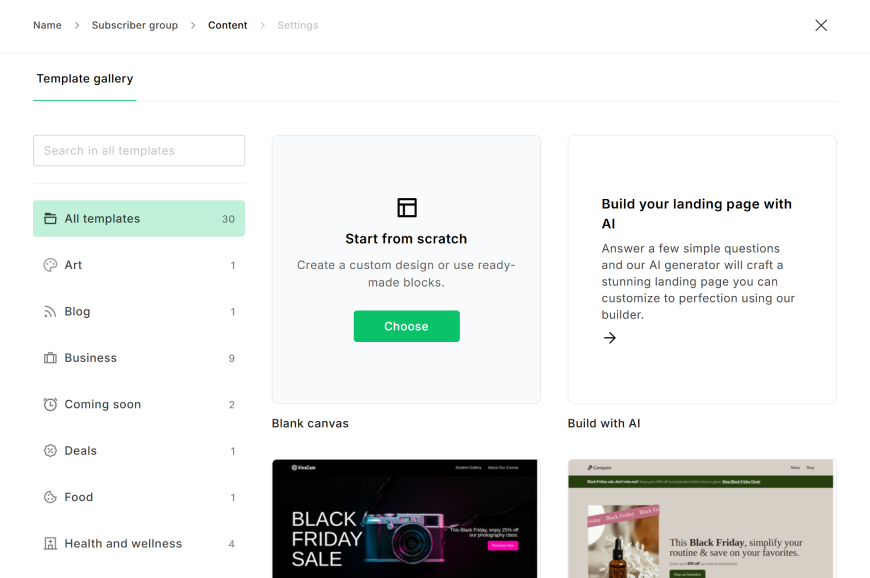
MailerLite includes both a landing page builder and a full website builder in every plan. (Curious how it compares to us? See how Mailercloud compares to MailerLite.) On the free plan, you can create up to 10 landing pages and a complete website with blog. Paid plans unlock unlimited landing pages. The builder is clean, with drag-and-drop blocks, and the templates (while not massive in number) are well-designed.
Mailchimp has landing pages and a basic website builder, but the experience feels like an add-on rather than a core feature. Landing page templates are limited (49 pre-made options), and the website builder hasn’t seen major updates recently. Free plan users get landing pages but with Mailchimp branding and fewer customization options.
For anyone building a simple business website alongside their email marketing — or who needs landing pages for lead magnets without paying extra — MailerLite is the clear winner. This round isn’t close.
Round 8: A/B Testing
Winner: Mailchimp · Running Score: MailerLite 4 – Mailchimp 4
Mailchimp offers A/B testing on the Essentials plan and multivariate testing (up to 8 combinations) on Premium ($350/month). A/B tests can vary subject lines, sender names, content, and send times. The automatic winner selection sends the best-performing version to the remaining list after the test window closes.
MailerLite provides A/B testing for subject lines, email content, and sender info on all plans including free. However, it’s limited to two variants (A vs B), and there’s no multivariate testing option at any price. The testing interface is simple and functional but offers less granularity.
For most users, MailerLite’s A/B testing is sufficient. But Mailchimp’s multivariate testing and more granular split options give it the edge for teams that run frequent optimization tests. Mailchimp takes this one.
Round 9: Deliverability
Winner: MailerLite · Running Score: MailerLite 5 – Mailchimp 4
This is the round that matters most — and it’s where the gap is widest.
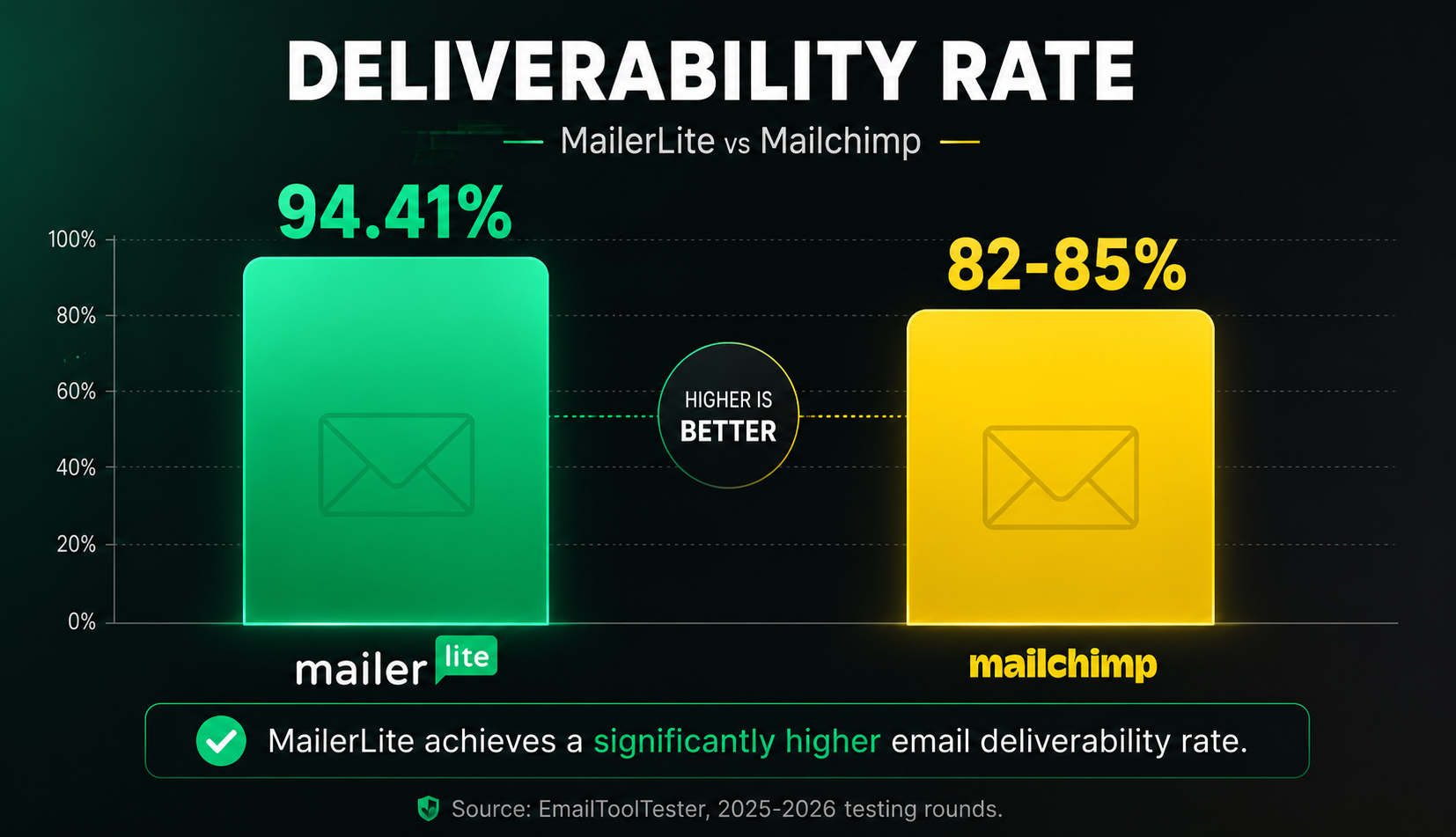
EmailToolTester’s ongoing deliverability tests (running since 2018, updated regularly) show MailerLite averaging a 94.41% deliverability rate across their last five testing rounds. MailerLite earned their “Best of 5” deliverability award based on these results.
Mailchimp’s deliverability has been declining. EmailToolTester’s 2025 results placed Mailchimp at the bottom among reviewed platforms, with reports of 11.8% spam flagging rates and inbox placement rates in the 82–85% range. The EmailDeliverabilityReport.com 2026 assessment gave Mailchimp a score of 92 vs MailerLite’s 89, but that’s a methodology difference — most independent testers we’ve reviewed show MailerLite outperforming Mailchimp on actual inbox placement.
Why the gap? MailerLite has a stricter account approval process. New accounts go through a manual review, and senders with poor practices get flagged or removed faster. This keeps the shared IP pool cleaner, which benefits everyone on the platform. Mailchimp’s larger user base and more permissive signup process means more marginal senders sharing IP reputation.
Both platforms support SPF, DKIM, and DMARC authentication. Both offer dedicated IPs on higher-tier plans. But when it comes to where your emails actually land — inbox vs spam — MailerLite has the edge in 2026. (See our guide to the best email deliverability services for a deeper look.)
Round 10: Reporting & Analytics
Winner: Mailchimp · Running Score: MailerLite 5 – Mailchimp 5
Mailchimp’s reporting is more comprehensive (though Mailercloud’s email campaign reports cover all the essentials too). Beyond the standard open rates, click rates, and bounce rates, Mailchimp shows: click maps (which links got clicked and where), purchase tracking tied to campaigns, social media performance for connected profiles, email client breakdowns (who opened in Gmail vs Outlook vs Apple Mail), and comparative campaign reports that let you benchmark against your own past sends.
The Standard plan adds audience growth reports and predicted demographics. Premium adds comparative audience reports and advanced statistical tools.
MailerLite covers the fundamentals well — opens, clicks, unsubscribes, bounce rates, device breakdowns, and geographic data. The click map feature is available. But there’s no built-in purchase attribution, no email client statistics, and the comparative reporting is more basic.
For newsletter creators who just need to know what’s working, MailerLite’s reporting is fine. For ecommerce operators or teams that want to dig into revenue per email and cross-campaign trends, Mailchimp’s analytics are measurably better. Mailchimp takes round 10.
Round 11: Integrations & App Ecosystem
Winner: Mailchimp · Running Score: MailerLite 5 – Mailchimp 6
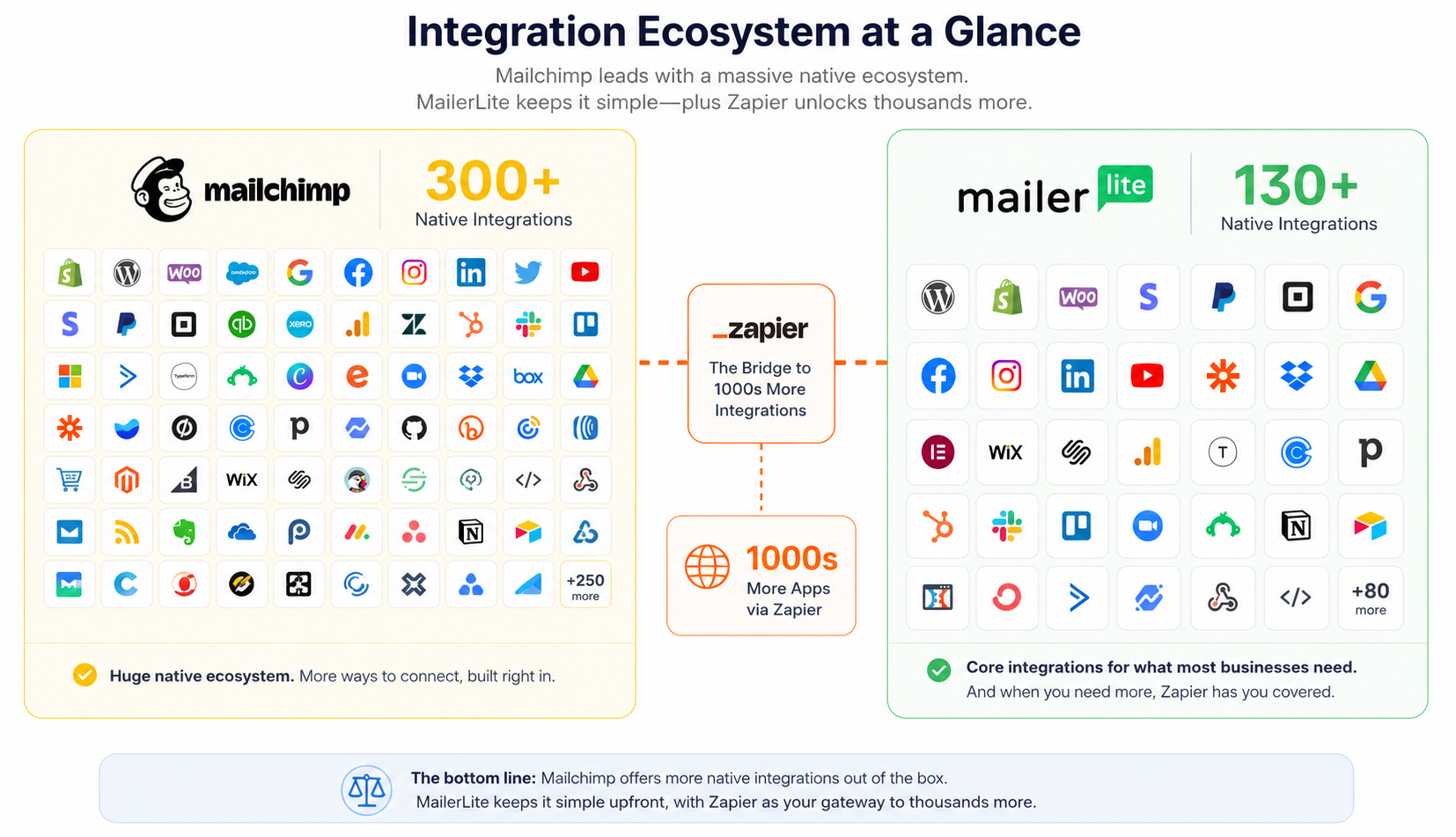
Mailchimp offers 300+ native integrations spanning CRMs, ecommerce platforms, social media tools, analytics, content management systems, and more. If you use Shopify, WooCommerce, Salesforce, WordPress, Stripe, or most mainstream SaaS tools, there’s a native Mailchimp integration. Teams wanting a tighter connection between web analytics and CRM often set up Google Analytics integration with Salesforce directly, rather than relying on the platform’s native connectors alone.
MailerLite has 130+ native integrations covering the core categories — ecommerce, CRM, analytics, social media, and website builders. The Shopify and WooCommerce integrations work well. For anything not natively supported, MailerLite connects to Zapier and offers an API for custom development.
The gap is real. If your tech stack includes niche or newer tools, you’re more likely to find a direct Mailchimp connector. Both platforms work with Zapier to fill gaps, but starting with a native integration is always cleaner and more reliable. Mailchimp wins on ecosystem breadth.
Round 12: Customer Support
Winner: MailerLite · Running Score: MailerLite 6 – Mailchimp 6
MailerLite provides 24/7 live chat and email support on every plan — including the free tier (email-only on free, live chat + email on paid). Response times during our testing averaged 4–8 minutes for live chat during business hours, and under 2 hours for email tickets.
Mailchimp’s support depends on your plan. The free plan gets email-only support for the first 30 days, then nothing. Essentials gets email and chat support. Standard adds that to phone support during business hours. Premium gets priority phone support.
If you’re on Mailchimp’s free or Essentials plan and hit a problem at 11 PM on a Saturday, you’re searching their knowledge base. On MailerLite, you’re chatting with a person. For small teams and solopreneurs without a dedicated email ops person, that accessibility matters. MailerLite takes round 12.
Round 13: Free Plan
Winner: MailerLite · Running Score: MailerLite 7 – Mailchimp 6
This round is decisive.
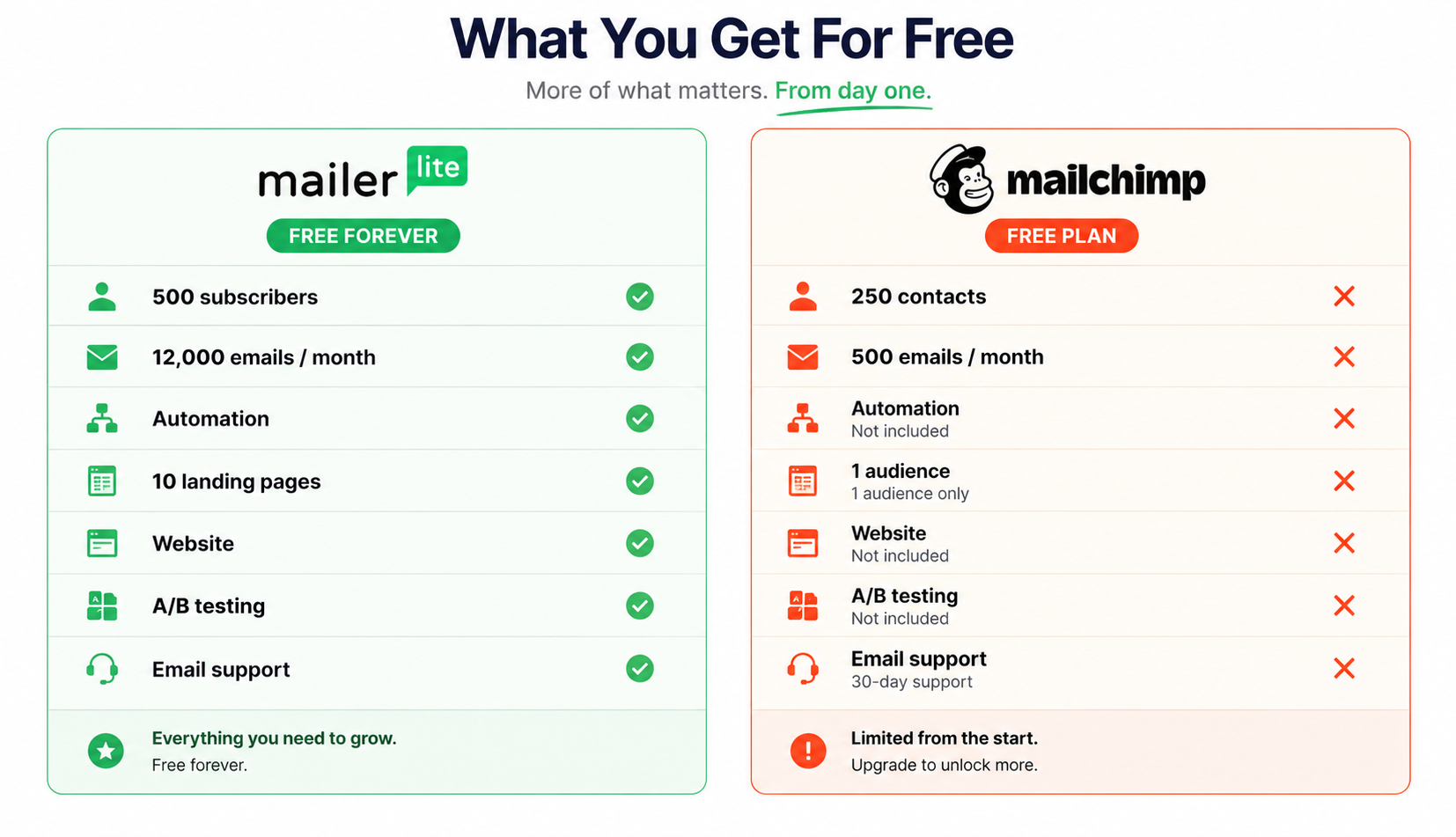
MailerLite Free Plan (2026): 500 subscribers, 12,000 emails/month, automation included, 10 landing pages, website builder, signup forms, A/B testing, and email support. MailerLite branding on emails. The subscriber limit dropped from 1,000 to 500 in September 2025, but it’s still functional.
Mailchimp Free Plan (2026): 250 contacts, 500 emails/month, no automation, 1 audience, basic templates, Mailchimp branding, 30-day email support (then nothing). The contact limit dropped from 500 to 250 in January 2026, and automation was fully stripped from the free tier in 2025.
MailerLite’s free plan gives you twice the contacts, 24x the monthly sends, working automations, landing pages, and a website builder. Mailchimp’s free plan is now closer to a 30-day trial than a usable ongoing tier. There’s no contest here — MailerLite wins round 13 by a wide margin.
Round 14: Pricing & Value for Money
Winner: MailerLite · Running Score: MailerLite 8 – Mailchimp 6
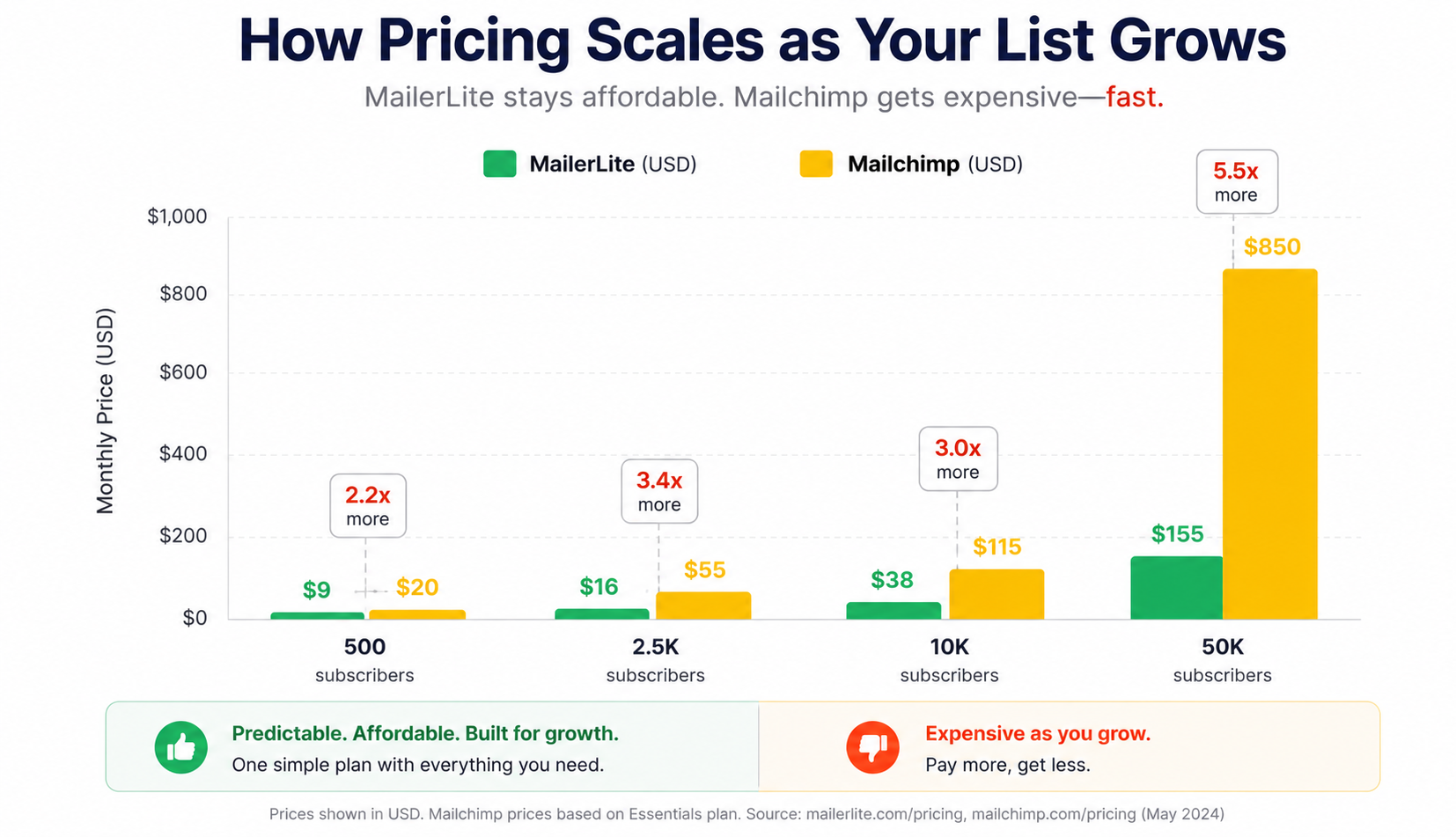
Here’s what you’ll pay at three common list sizes (entry-level paid plans, as of May 2026):
| List Size | MailerLite (Growing Business) | Mailchimp (Essentials) |
|---|---|---|
| 500 subscribers | $10/month | $13/month |
| 2,500 subscribers | $17/month | $45/month |
| 10,000 subscribers | $47/month | $100/month |
| 50,000 subscribers | $239/month | $385/month |
(MailerLite pricing from mailerlite.com/pricing, May 2026. Mailchimp pricing from mailchimp.com/pricing, May 2026.)
The gap widens as your list grows. At 10,000 subscribers, Mailchimp costs more than double MailerLite’s price for comparable functionality. And remember — Mailchimp counts unsubscribed contacts toward your billing total. MailerLite only bills for active subscribers you’ve actually emailed.
MailerLite also avoids the tier-gating that Mailchimp relies on. Features like automation, landing pages, and A/B testing are available at lower price points (or free). With Mailchimp, many of these require the Standard plan ($20/month base) or higher.
MailerLite takes the final round on pricing and value, and it’s the biggest margin of victory in this comparison.
Final Scoreboard: MailerLite 8, Mailchimp 6
| Round | Category | Winner | Running Score |
|---|---|---|---|
| 1 | Ease of Use & Email Editor | MailerLite | 1 – 0 |
| 2 | Email Design & Templates | Mailchimp | 1 – 1 |
| 3 | Personalization & Dynamic Content | Mailchimp | 1 – 2 |
| 4 | Marketing Automation | MailerLite | 2 – 2 |
| 5 | List Management & Segmentation | Mailchimp | 2 – 3 |
| 6 | Signup Forms & Pop-ups | MailerLite | 3 – 3 |
| 7 | Landing Pages & Website Builder | MailerLite | 4 – 3 |
| 8 | A/B Testing | Mailchimp | 4 – 4 |
| 9 | Deliverability | MailerLite | 5 – 4 |
| 10 | Reporting & Analytics | Mailchimp | 5 – 5 |
| 11 | Integrations & App Ecosystem | Mailchimp | 5 – 6 |
| 12 | Customer Support | MailerLite | 6 – 6 |
| 13 | Free Plan | MailerLite | 7 – 6 |
| 14 | Pricing & Value for Money | MailerLite | 8 – 6 |
Final Result: MailerLite 8 – Mailchimp 6
MailerLite wins on value, deliverability, and daily usability. Mailchimp wins on feature depth and ecosystem.
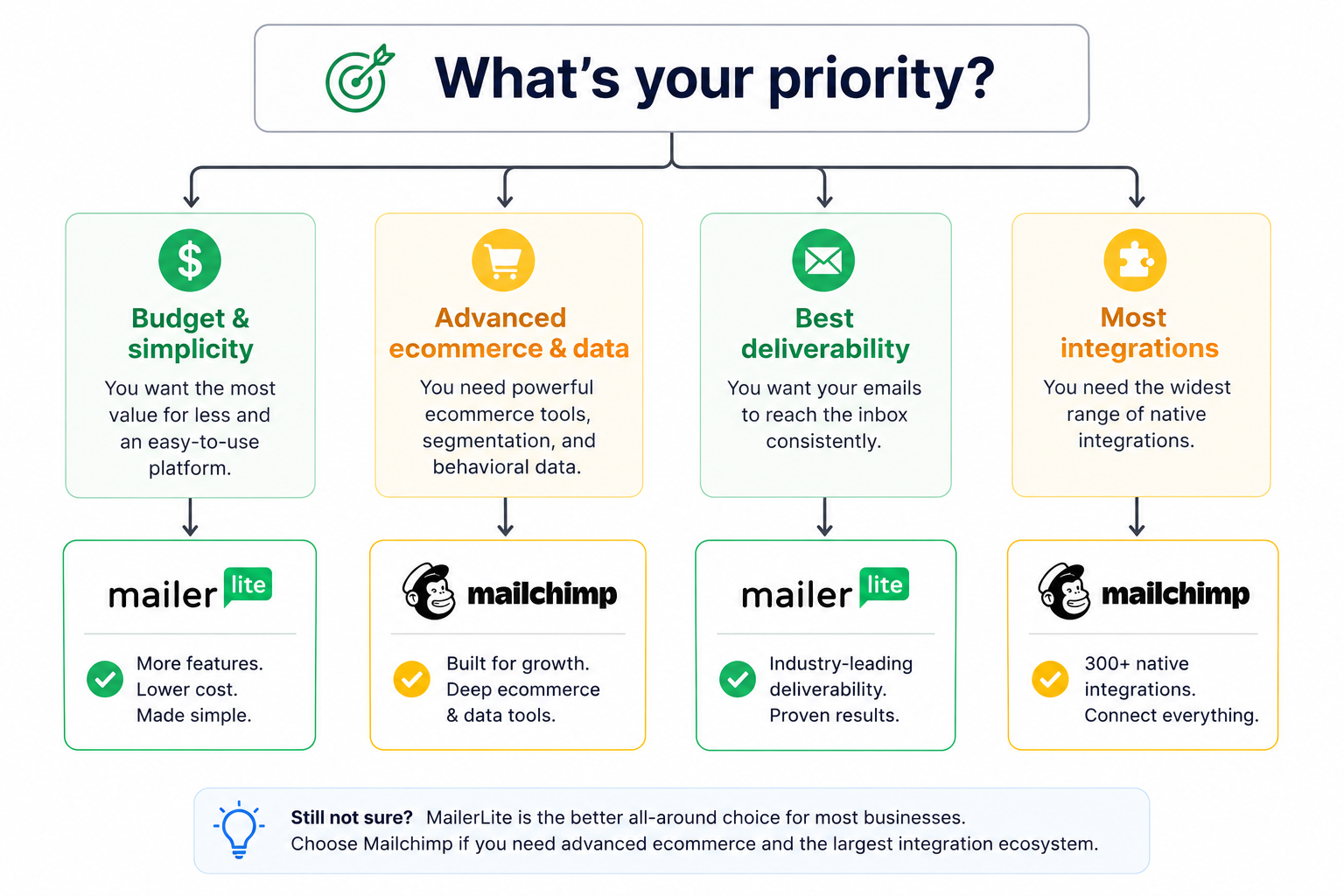
MailerLite wins this head-to-head, but the score tells a nuanced story. Mailchimp is the better platform if your priorities are deep segmentation, a large app ecosystem, advanced reporting with revenue attribution, and multivariate testing. It’s the tool for data-driven teams with bigger budgets who need granular control.
MailerLite wins on the things that affect your daily experience and your bottom line: a faster editor, better deliverability, more generous free and paid plans, 24/7 support regardless of plan, and pricing that doesn’t punish you for growing your list. For a broader view, see our best email marketing software in 2026 roundup.
MailerLite Pros and Cons
MailerLite
✅Pros:
- Clean, fast drag-and-drop editor that loads without lag
- Automation included on every plan — even the free tier
- 94.41% average deliverability in EmailToolTester tests (best of 5 award)
- Free plan: 500 subscribers, 12,000 emails/month with actual functionality
- Landing page and website builder included at no extra cost
- Only bills for active subscribers — unsubscribes and bounces don’t count
- 24/7 live chat and email support on all paid plans
- A/B testing available on every plan including free
- Straightforward pricing that costs 40–55% less than Mailchimp at comparable tiers
- Direct Mailchimp migration tool for easy switching
❌Cons:
- Smaller template library (100+ vs Mailchimp’s 220+)
- 130+ integrations — fewer than Mailchimp’s 300+ native connections
- No multivariate testing (A/B only, no 3+ variant splits)
- Reporting covers fundamentals but lacks revenue attribution and email client stats
- Free plan reduced from 1,000 to 500 subscribers in September 2025
- Strict account approval process (good for deliverability, but can slow initial setup)
⭐G2 Rating: 4.7 / 5 · Starting Price: Free, then $10/month (Growing Business plan, 500 subscribers)
Mailchimp Pros and Cons
Mailchimp
✅Pros:
- 300+ native integrations covering nearly every SaaS tool on the market
- 220+ email templates sorted by industry and campaign type
- Advanced segmentation with purchase-based and predicted-demographic targeting
- Customer Journey Builder with multi-step branching and behavioral triggers
- Multivariate testing (up to 8 combinations on Premium)
- Detailed reporting with revenue attribution, click maps, and email client stats
- AI content assistant built into the email editor
- Strong ecommerce integrations (Shopify, WooCommerce, BigCommerce)
❌Cons:
- Free plan gutted: 250 contacts, 500 sends/month, no automation, 30-day support then nothing
- Bills for ALL contacts including unsubscribed and non-subscribed addresses
- Pricing roughly doubles MailerLite’s at comparable list sizes (e.g., $100/mo vs $47/mo at 10K subs)
- Deliverability declined in independent tests — 82–85% inbox placement, 11.8% spam flagging rate
- Core features (automation, advanced segmentation) gated behind Standard plan ($20/mo+)
- Editor can feel sluggish with longer emails and nested content blocks
- Support only available 24/7 on Premium ($350/month) — free and Essentials users have limited access
⭐G2 Rating: 4.4 / 5 · Starting Price: Free (limited), then $13/month (Essentials plan, 500 contacts)
Which Should You Choose?
Choose MailerLite if:
You’re a solopreneur, blogger, small business, or newsletter operator who wants a clean, fast email platform that doesn’t charge a premium for core features. MailerLite is especially good if you need automation on a budget, value deliverability, want landing pages and a website without paying extra, or are just starting and need a free plan that’s actually usable for more than a week.
Choose Mailchimp if:
You run an ecommerce store that needs deep purchase-based segmentation and revenue tracking. You need 300+ native integrations because your tech stack includes niche tools. You have the budget for the Standard or Premium plan and want multivariate testing, advanced reporting, and predicted demographics. Or your team is already deep into the Mailchimp ecosystem and migration isn’t worth the disruption.
How to Switch from Mailchimp to MailerLite
If you’ve decided to make the move (or want to explore the best Mailchimp alternatives first), here’s the short version:
Export your contacts from Mailchimp (Audience → All contacts → Export). MailerLite has a direct Mailchimp import tool — connect your Mailchimp account, select which lists to bring over, and MailerLite handles the field mapping. Subscriber tags and groups transfer. Templates don’t migrate automatically — you’ll need to rebuild them in MailerLite’s editor, which takes a few hours depending on how many you use. Automations need to be recreated from scratch, but MailerLite’s workflow builder is simple enough that it’s usually a one-afternoon project.
MailerLite also has a dedicated Mailchimp migration guide that walks through every step.
FAQ
Is MailerLite better than Mailchimp in 2026?
MailerLite is the better choice for most small businesses and newsletter operators in 2026. It offers higher deliverability rates (94.41% average vs Mailchimp’s 82–85% in independent tests), more generous free and paid plans, automation included at every tier, and pricing that costs roughly half of Mailchimp at comparable list sizes. Mailchimp remains stronger for ecommerce businesses that need deep segmentation and revenue attribution.
Is Mailchimp still worth it in 2026?
Mailchimp is still worth it if you specifically need its advanced segmentation, 300+ native integrations, multivariate testing, or purchase-based reporting — and you have the budget for the Standard plan ($20/month) or higher. If neither fits, explore our best MailerLite alternatives roundup. For basic email marketing and newsletters, Mailchimp’s pricing and recent free plan cuts (250 contacts, no automation) make it harder to justify against cheaper alternatives.
Is MailerLite cheaper than Mailchimp?
MailerLite is significantly cheaper than Mailchimp at every list size — and Mailercloud is even more affordable. At 500 subscribers, MailerLite’s Growing Business plan costs $10/month vs Mailchimp’s Essentials at $13/month. At 10,000 subscribers, the gap widens to $47/month vs $100/month. MailerLite also only bills for active contacts, while Mailchimp counts unsubscribed and bounced addresses toward your total.
Can I migrate from Mailchimp to MailerLite?
Yes, MailerLite offers a direct Mailchimp migration tool. You connect your Mailchimp account, select which lists to import, and MailerLite transfers your subscribers with field mapping. Tags and groups come through. Email templates and automations need to be manually recreated, which typically takes a few hours to an afternoon depending on complexity.
Does MailerLite have good deliverability?
MailerLite has some of the best deliverability rates in the email marketing industry. EmailToolTester’s ongoing tests show MailerLite averaging 94.41% deliverability across their last five testing rounds, earning the “Best of 5” deliverability award. The strict account approval process keeps their shared IP reputation clean, which benefits all senders on the platform.
What are the main differences between MailerLite and Mailchimp?
The main differences between MailerLite and Mailchimp come down to five areas: pricing (MailerLite costs 40–55% less at most list sizes), free plan generosity (MailerLite offers 500 contacts with automation vs Mailchimp’s 250 with no automation), deliverability (MailerLite leads in independent tests), feature depth (Mailchimp has deeper segmentation and more integrations), and support accessibility (MailerLite provides 24/7 support on all plans while Mailchimp gates support by tier).

As a Marketing Director, I develop and implement marketing strategies, conduct market research, and manage a team of marketing professionals. With a successful track record of launching campaigns that drive revenue growth, I bring my marketing expertise to blog writing, creating engaging content that promotes the brand and its products/services.